This is default featured slide 1 title

Go to Blogger edit html and find these sentences.Now replace these sentences with your own descriptions.

This is default featured slide 2 title

Go to Blogger edit html and find these sentences.Now replace these sentences with your own descriptions.

This is default featured slide 3 title

Go to Blogger edit html and find these sentences.Now replace these sentences with your own descriptions.

This is default featured slide 4 title

Go to Blogger edit html and find these sentences.Now replace these sentences with your own descriptions.

This is default featured slide 5 title

Go to Blogger edit html and find these sentences.Now replace these sentences with your own descriptions.

Wednesday, June 03, 2015

PHILIPPINE BANKS ROUTING NUMBER AND SWIFT CODES

I was updating may billing details  and I choose Wire and it needed routing number. I thought of sharing this info that might be of help as you needed.
These are Routing numbers and Swift codes for the Philippine banks. Very important to know when you need to send money to your family to their/your bank account.


PHILIPPINE BANKS ROUTING NUMBER


ALLIED BANKING CORP                           010320013

AUSTRALIA NEW ZEALAND                    010700015

ASIA UNITED BANK                                   011020011

BANGKO SENTRAL NG PILIPINAS          010030015

BANGKOK BANK                                        010670019

BANK OF AMERICA                                   010120019

BANK OF CHINA                                         011140014
 
BANK OF TOKYO                                        010460012

BANCO DE ORO (& EPCIB)                       010530667

BANK OF COMMERCE                               010440016

BANK OF THE PHIL ISLANDS                  010040018

CHINA BANKING CORP                             010100013

CHINA TRUST COMML BANK                  010690015

CITIBANK N.A.                                             010070017

DEVT BANK OF THE PHILS                      010590018

DEUTSCHE BANK                                       010650013

EAST WEST BANK                                      010620014

EXPORT & INDUSTRY BANK                   010860010

FUJI BANK                                                    010640010

HONGKONG AND SHANGHAI BANK      010060014

INTL COMML BANK OF CHINA                010560019

INTL EXCHANGE BANK                             010680012

JP MORGAN CHASE BANK                         010720011

KOREA EXCHANGE BANK                         010710018

INTL NEDERLAND BANK                           010660016

LAND BANK OF THE PHILS                        010350025

MAYBANK OF THE PHILS                           010220016

METROPOLITAN BANK & TRUST CO       010269996

PHIL BANK OF COMMUNICATION            010110016

PHIL TRUST COMPANY                                010090039

PHIL NATIONAL BANK                                 010080010

PRUDENTIAL BANK                                      010150018

PHIL VETERANS BANK                                010330016

RIZAL COMML BANKING CORP                 010280014

SECURITY BANK & TRUST CO                    010140015

STANDARD CHARTERED BANK                  010050011

UNITED COCONUT PLANTERS BANK        010299995

UNION BANK OF THE PHILS                        010419995

UNITED OVERSEAS BANK                            010270189
-------------------------------------------------------------------------------------------------------------------------------------------------------------------------

PHILIPPINE BANKS SWIFT CODES

Allied Banking Corporation –                      ABCMPHMM

American Express Bank Philippines –          AMEXPHMM

Banco de Oro Universal Bank –                    BNORPHMM

Bank of China Manila Branch –                    BKCHPHMM

Bank of Commerce –                                     PABIPHMM

Bank of the Philippine Islands –                    BOPIPHMM

China Banking Corporation –                        CHBKPHMM

Development Bank of the Phil. –                   DBPHPHMM

East West Banking Corporation –                  EWBCPHMM

Equitable PCI Bank –                                     PCIBPHMM

Hong Kong and Shanghai Bank –                  HSBCPHMM

International Comm Bank of China –            ICBCPHMM

International Exchange Bank –                      INXBPHMM

Land Bank of the Philippines –                      TLBPPHMM

Maybank Philippines Incorporated –              MBBEPHMM

Metropolitan Bank & Trust Co. –                   MBTCPHMM

Philippine Bank of Communications –           CPHIPHMM

Philippine National Bank –                             PNBMPHMM

Philippine Veterans Bank –                             PHVBPHMM

Philtrust Bank –                                               PHTBPHMM

Prudential Bank –                                            PILBPHMM

Rizal Commercial Banking Corp –                 RCBCPHMM

Security Bank and Trust Corp –                      SETCPHMM

Standard Chartered Bank –                              SCBLPHMM

Union Bank of the Philippines –                      UBPHPHMM

United Coconut Planters Bank –                      UCPBPHMM

United Overseas Bank Philippines –               UOVBPHMM 


Tuesday, June 02, 2015

ODiN is the World’s First Laser Projection Mouse

Users who buy the product will receive a small projector that can sit on top of a table, and connects to a PC via its USB port. It works by displaying a virtual trackpad on a hard surface like a table. For users, this means they’ll essentially see a small box, made out of red light, with the right and left click buttons projected at the top of the trackpad.

ODiN is the world’s first laser projection mouse, claims its creator, Taiwanese company Serafim Technologies. The device was shown off on Monday, a day before the Computex trade show in Taipei.

To read the gestures, the projector has built-in sensors that can track a user’s finger movements over the trackpad. The company created the product as a way to meld together mouse and touchscreen functions together, said Serafim’s CEO GZ Chen.

For instance, the product’s virtual trackpad can read multi-finger gestures. When a user taps the trackpad with two fingers, and swipes left, the PC’s Internet browser will move back a webpage. By swiping right, the PC’s browser will move forward a webpage.


Users can also pinch the trackpad with two fingers to zoom in or zoom out.


ODiN is the World’s First Laser Projection Mouse
Posted by Blogmytuts.blogspot.com on Tuesday, 2 June 2015


Serafim’s CEO said it also developed the product, as a way for certain industries to do away with computer mouses that collect germs and dirt over repeated use. The company plans to continually offer software updates to the ODiN, as a way to optimize its functions.

The ODiN launches this month and will be priced at $69. It was also featured on Kickstarter.


Securing Email Communications from Facebook with PGP Key

It's very important to us that the people who use Facebook feel safe and can trust that their connection to Facebook is secure; for instance this is why we run connections to our site over HTTPS with HSTS and why we provide a Tor onion site for people who want to enjoy security guarantees beyond those offered by HTTPS.

However these technologies protect only the direct connections people make to Facebook. People also receive information from us over channels such as email. Whilst Facebook seeks to secure connections to your email provider with TLS, the stored content of those messages may be accessible as plaintext (with attachments) to anyone who accesses your email provider or email account.

To enhance the privacy of this email content, today we are gradually rolling out an experimental new feature that enables people to add OpenPGP public keys to their profile; these keys can be used to "end-to-end" encrypt notification emails sent from Facebook to your preferred email accounts. People may also choose to share OpenPGP keys from their profile, with or without enabling encrypted notifications.

Where encrypted notifications are enabled, Facebook will sign outbound messages using our own key to provide greater assurance that the contents of inbound emails are genuine.

You will be able to update your own public key, using a desktop browser, at:
https://www.facebook.com/me/about?section=contact-info


Technology

Created as PGP nearly 25 years ago by Phil Zimmermann, OpenPGP is one of the most popular available standards for protecting email with public key encryption. If you are unfamiliar with using OpenPGP technology, the Electronic Frontier Foundation offers an introduction:
...with installation guides for:
For our implementation we have chosen to use GNU Privacy Guard - “GPG” - a widely used and free implementation of the OpenPGP standard. Facebook is a supporter of GPG and we encourage others to support GPG as well.

Key Fingerprints & Roadmap

Facebook's OpenPGP key comprises a long term primary key with short term subkeys; this allows us to frequently rotate our operational keys whilst maintaining the web of trust and a consistent identity over time. As of the time of writing our primary key has the fingerprint:

31A7 0953 D8D5 90BA 1FAB 3776 2F38 98CE DEE9 58CF

…with the following operational subkey fingerprint:

D8B1 153C 9BE9 C7FD B62F 7861 DBF4 E8A2 96FD E3D7

Facebook notifications are encrypted with a version of GPG that supports encryption with the RSA or ElGamal algorithms; we are investigating the addition of support for GPG's newer elliptic curve algorithms in the near future. 

Finally: public key management is not yet supported on mobile devices; we are investigating ways to enable this.


How to use PGP to send encrypted emails?

In case if you want to send and receive encrypted email using PGP, you will first need to install some extra software given below:

  • GPG4Win: GNU Privacy Guard for Windows known as GnuPG
  • Enigmail
  • Mozilla Thunderbird

Using GPG4Win software, you can create your Public and Private PGP keys. Public Key is something that others will need to know before they can send you encrypted mail. However, Private PGP key will be used to decrypt emails you receive, which you need to keep secret from everyone.
The picture  is from : https://www.igolder.com/pgp/generate-key/

Source : Facebook  Protect the Graph


Google will turn your devices into your passwords - Project Vault microSD

Project Vault, designed by Google's ATAP (Advanced Technology and Projects) group, is a secure computer entirely packed onto a microSD card that can be plugged into any system whether it’s a desktop or a mobile phone.

That’s a really catching name announced on the second day of the annual Google I/O developers conference on Friday

The vault is technically a computer though it is not for regular computing. Rather it is a new and secure way to communicate and authenticate without entering passwords.

Today we often choose passwords that we find clever or easy to remember, but Google wants to make the password more personal than we think.

The tiny little chip can authenticate you even before an app or a website asks for your password. In short, Vault will make your primary authentication (which we currently do use passwords) a secondary one, without you having to do anything.


With Project Vault, Google will turn your devices into your passwords. It is capable to encrypt, or scramble, your app is chat messages and provide extra levels of authentication, so your device makes very sure that you are you.

While giving a demo, ATAP team showed how two users can securely chat with each other using Vault-equipped smartphones. Once the chip is installed, the chat application just opens the virtualized two-file system with the read/write I/O.

Vault encrypts the chat messages and then sends it as ciphertext through its encrypted channel, and never sends through the phone so that no one can snoop on you. The phone automatically decrypts the messages, but will never actually be able to see any keys or algorithms on either end.

The company says you will also be able to encrypt video with Vault.

Project Vault has:

  • An ARM-based processor
  • An antenna
  • A near-field communication (NFC) for communicating with nearby devices
  • 4 gigabytes of "isolated, sealed" internal storage
  • Its ultra-secure operating system focused on privacy and data security
  • A suite of cryptographic services


Vault runs a custom-built Real-Time Operating System (RTOS) with a suite of cryptographic services, including hashing, batch encryption, signing and a hardware random number generator, in order to keep your data and messages with friends secure.

Vault works with any operating system -- including Google's Android, Windows, Linux and Apple's OS X -- since essentially it is just a generic storage device to the host computer or phone.

I called the move smarter because here all the work is done by the host without the users having to deal with the configuration of the device, making it as user-friendly as possible.

Project Vault is still "very much in the experimental stage" and in process of being ready for users, but the source code for the system is available on GitHub under an open-source license so that developers can start delving into it.

FBI SEIZED MEGAUPLOAD DOMAINS LINK TO SCAM ADS AND MALWARE

Well over three years have passed since Megaupload was shutdown, but there is still little progress in the criminal proceedings against the operation.

The United States hopes that New Zealand will extradite Kim Dotcom and his colleagues, but the hearings have been delayed several times already.

Meanwhile, several domain names including the popular Megaupload.com and Megavideo.com remain under the control of the U.S. Government. At least, that should be the case. In reality, however, they’re now being exploited by ‘cyber criminals.’

Instead of a banner announcing that the domains names have been seized as part of a criminal investigation they now direct people to a Zero-Click adverting feed. This feed often links to malware installers and other malicious ads.

One of the many malicious “ads” the Megaupload and Megavideo domain names are serving links to a fake BBC article, suggesting people can get an iPhone 6 for only £1.

The Department of Justice has made a grave error as several seized Megaupload domains are now being exploited for nefarious purposes. A few days ago both Megaupload.com and Megavideo.com began directing visitors to scams and malware, presumably because the FBI's cybercrime unit lost control of the main nameserver.

And here is another example of a malicious ad prompting visitors to update their browser.


The question that immediately comes to mind is this: How can it be that the Department of Justice is allowing the domains to be used for such nefarious purposes?

Looking at the Whois records everything seems to be in order. The domain name still lists Megaupload Limited as registrant, which is as it was before. Nothing out of the ordinary.

The nameserver PLEASEDROPTHISHOST15525.CIRFU.BIZ, on the other hand, triggers several alarm bells.


CIRFU refers to the FBI’s Cyber Initiative and Resource Fusion Unit, a specialized tech team tasked with handling online crime and scams. The unit used the CIRFU.NET domain name as nameserver for various seized domains, including the Mega ones.

Interestingly, the CIRFU.NET domain now lists “Syndk8 Media Limited” as registrant, which doesn’t appear to have any connections with the FBI. Similarly, CIRFU.BIZ is not an official CIRFU domain either and points to a server in the Netherlands hosted by LeaseWeb.

It appears that the domain which the Department of Justice (DoJ) used as nameserver is no longer in control of the Government. Perhaps it expired, or was taken over via other means.

As a result, Megaupload and Megavideo are now serving malicious ads, run by the third party that controls the nameserver.

This is quite a mistake for one of the country’s top cybercrime units, to say the least. It’s also one that affects tends of thousands of people, as the Megaupload.com domain remains frequently visited.

Commenting on the rogue domains, Megaupload founder Kim Dotcom notes that the people who are responsible should have known better.

“With U.S. Assistant Attorney Jay Prabhu the DOJ in Virginia employs a guy who doesn’t know the difference between civil & criminal law. And after this recent abuse of our seized Mega domains I wonder how this guy was appointed Chief of the Cybercrime Unit when he can’t even do the basics like safeguard the domains he has seized,” he tells TF.

“Jay Prabhu keeps embarrassing the U.S. government. I would send him back to law school and give him a crash course in ‘how the Internet works’,” Dotcom adds.

Making matters worse for the Government, Megaupload.com and Megavideo.com are not the only domain names affected. Various poker domains that were previously seized, including absolutepoker.com and ultimatebet.com, also link to malicious content now.

While the Government appears to have lost control of the old nameservers, it can still correct the problem through a nameserver update at their end. However, that doesn’t save those people who had their systems compromised during recent days, and it certainly won’t repair the PR damage.


SanDisk's new 128GB flash drive is the size of a penny

This ultra-small, low profile drive stays put for extra storage, or moves media super-fast between devices. Enjoy performance speeds up to ten times faster than standard USB 2.0 drives**, transfer a full-length move in less than 40 seconds**

The drives support SanDisk’s SecureAccess software for creating password-protected folders with 128-bit AES encryption. They also include a year’s subscription to RescuePro, which can help recover corrupted or accidentally deleted files.

Neither drive comes cheap, however, with suggested prices of $120 for the 128GB Ultra Fit, and $200 for the 256GB Ultra. They should both be available soon through SanDisk’s website and through online retailers, where they’ll hopefully get some discounts before too long.

Why this matters: Higher capacities from major storage makers are always good news, even if you can’t fathom packing so much data onto a thumb drive. The new options are sure to drive prices down through the rest of the line, as we’re already seeing SanDisk’s 64GB Ultra Fit sell for just $27.50 on Amazon. (pababa ng pababa ang price habang may bagong labas)

  • High Performance USB 3.0 speeds - up to 130MB/s read
  • Capacities up to 128GB**
  • Ideal for notebooks, game consoles, TVs, in-car audio systems and more
  • Warranty: United States: 5-year limited; All other regions: 5-year


Stays-put Storage for All Your Devices
Extend your storage capacity by up to 128GB with this tiny, unobtrusive USB 3.0 flash drive. Connect it to hard-to-access TV USB ports for video playback or let it ride along in your notebook or car audio system wherever you go.

Move Media Super-fast Wherever You Go
The wait is over with high speed USB 3.0 performance. Now it’s easier than ever to share your videos, photos and music collection among devices. Transfer a full-length movie up to 10 times faster than standard USB 2.0 drives**.

Keep Your Private Files Private
The SanDisk Ultra Fit USB 3.0 flash drive comes with SanDisk SecureAccess, which creates a password-protected private folder on your flash drive. With your private files protected with 128-bit AES encryption, you'll be able to share your USB drive without compromising your privacy.

Recover Lost or Corrupted Files
With a year’s free subscription to RescuePRO® software, you’ll be able to get back that file you didn’t mean to delete or the one that went missing when your computer crashed. The SanDisk Ultra Fit™ USB 3.0 is extra safe and secure.


Monday, June 01, 2015

Here's How to Hack digital pictures to send malicious exploits

The next time someone sends you a link to picture, be it that of a funny cat or a beautiful sunset, be careful before you click on it—it might hack your computer.

That image might look just like another regular image, but thanks to a technique devised by Saumil Shah, a security researcher from India, a hacker could hide malicious code inside the picture’s pixels, literally hiding an exploit in plain sight.

The malicious code, dubbed IMAJS, is a combination of both image code as well as JavaScript hidden into a JPG or PNG image file. Shah hides the malicious code within the image’s pixels, and unless somebody zoom a lot into it, the image looks just fine from the outside.

The technique is called “Stegosploit” and Shah gave Motherboard a demo of the technique ahead of the talk he gave on Thursday at the Amsterdam hacking conference Hack In The Box.

Shah has found a way to hide malicious code directly into an image using steganography, an ancient technique that consist of stashing secret text or images in a different text or images. In this case, the malicious code or exploit is encoded inside the picture’s pixels, and it’s then decoded using an HTML 5 element called Canvas, which allows for dynamic rendering of images. Shah calls it the “magic sauce” behind Stegosploit.


This way, Shah said, all he needs to hack someone is an image file, nothing more.

“I don’t need to host a blog, I don’t need to host a website at all. I don’t even need to register a domain,” Shah told Motherboard during the demo last week. “I can take an image, upload it somewhere and if I just point you toward that image, and you load this image in a browser, it will detonate.”

The malicious code, which Shah calls “IMAJS,” is a mix of image code and javascript hidden into a JPG or PNG file. Shah hides the code within the picture’s pixels, and from the outside, unless you zoom a lot into it, the picture looks just fine.

Shah, who’s been working on this research during his spare time for almost five years, showed me exactly how it works using my own profile picture in a Skype demo. He then prepared a demo video for Motherboard using his own picture as the guinea pig.


In the first video, embedded above, Shah shows step by step how he is able to hide malicious code inside an image file, using steganography.


In this second video, Shah shows how Stegosploit actually works. He has programmed the image to run the exploit when the target opens the image on his or her browser (this technique only works in browsers) and clicks on it (he could program it to run it when the image is loaded too).

Once the target clicks on the image, you can see the computer’s CPU shooting up to 100 percent usage, indicating the exploit worked. The malicious code then sends data from the target’s computer back to the attacker, and creates a text file on the target’s computer that says: “You are hacked!”

I asked Shah to make that text file to theatrically show that a hacker could do practically anything he wants on a victim’s computer using his technique. Shah, however, could have programmed the malicious image to do something more stealthy, such as downloading and installing spyware, or pilfering data out of the victim’s computer.

For him, the big takeaway here is that image files should not be “presumed innocent” anymore. They can hide malicious code just like PDFs or other types of files that are typically used to deliver an exploit.

Patrick Wardle, the director of research at Synack, who has previously worked at the NSA, said that Stegosploit would be a good way for attackers to bypass detection on some image sharing websites, though advanced scanners should be able to detect an image that contains malicious javascript code.

In any case, for these techniques to work, an attacker still needs to take advantage of a vulnerable (in other words, unpatched) browser, and an exploit that can take advantage of that, according to Ken Westin, a senior analyst at web security company Tripwire.

Shah himself hasn’t fully tested his technique on known image sharing sites such as Imgur or Dropbox, and he admits that it might not work everywhere. The malicious file has to be uploaded without an extension for the browser to be tricked into rendering it, and some sites, such as Dropbox, don’t allow that. Moreover sites like Facebook reprocess the images when they are uploaded, causing the loss of the malicious code, according to Shah.

"These techniques are coming, sooner or later."
You should not presume the image files as "innocent" anymore, as they can hide malicious code deep inside its pixels that could infect your computers.
In other words, this is not an easy technique to reproduce, and there’s no evidence it’s been used in the wild yet. Still, Shah believes it’s just a matter of time and that “these techniques are coming, sooner or later.”

“You’re never the only one to figure things out,” he said during our conversation. “I’m the only one talking about it on stage but I’m sure there are other people that have figured this out."


MyHotspot - Turn your Laptop or PC to a Hotspot with Login Portal

MyHotspot- Wireless-LAN for Hotels and Cafés!
Give your customers the flexibility and extra mobility with Wireless Internet Access
MyHotspot is a professional Wireless LAN software solution for providing internet access to your customers. Customers will be redirected to your login page to authenticate with user account or a prepaid-code before getting the Internet access. The PayPal payment option allows your customers to create and pay for network access directly. The software controls download, upload, data transfer, time usage, visited pages. MyHotSpot Billing software runs on your Windows PC, controls unlimited user or prepaid-code accounts, and displays data to customers on your self-branded pages.
MyHotspot billing software is the definitive tool for managing your public WIFI-HotSpot in internet cafes, shools, hotels, bistros or gaming cafe / game center.


How it works this Hotspot system?

Login page 

When a customer connects to your network and type any website address, login page will be displayed in browser and prompted to authenticate with user or code-account


Mobile login page 

MyHotspot is specifically designed for use on mobile devices (e.g Smartphones,Tabletts). MyHotspot detect if the customer is on a mobile or desktop device and then redirect them to the appropriate website version.


Error dialog 

The Error dialog will be automatically displayed by entering a invalid data, expired or disabled account.


Free Websites and Free Access 

MyHotspot software gives you ability to specify free Websites your users will be able to open without authentication.


Your customer get a free internet access by login with their social account. Default Free Time 1 hour.


Successful Login 

If the customer entered correct details, login would be granted. Infobox is useful as it keeps a customer informed about the current balance an remaining time.


Installation WLAN  to WLAN2 adhoc (192.168.137.1)


WLAN or LAN1 TO LAN2 (192.168.137.1) Router (192.168.137.2) must be disabled DHCP


1. Download MyHotSpot  and install it, a reboot is required. Make sure your WiFi hotspot is running after the restart.
(Skip ads in 5 seconds)
http://goo.gl/forms/jF3dfC89CF


Software installation:

  • Please make sure to remove the program SKYPE "skype.exe" from your computer. this program use the port 80. Hindi Kasi Mag wowork yung Portal
  • Start the setup file on your windows PC to Install Myhotspot software.
  • The Internet Connection Sharing (ICS) must be enabled During the installation process. The network wizard will be launched.
  • You must restart your computer after installing MyHotspot.
  • If you use Windows Vista/7/8/10 make sure to run MyHotspot with administrator rights. Right click on the program, and click on "Run as administrator".


2. Launch the program and at the Network Configuration window, make sure Automatic is selected and choose the adapter that connects to the internet at the top drop down menu and the hotspot below. Click Next.

Hardware installation:
  • Connect the first network card (LAN1) or the USB surf stick to the Internet and make sure that the Internet connection is working on your computer, and the IP assigned to this network card is not "192.168.0.x" and not "192.168.137.x".
  • Connect the second network card (LAN2) to LAN port (not to WAN port) of your wireless access point or wireless router.
    (Example: NETGEAR-WLAN-Router)

  • Configuration of the Wireless Access Point:
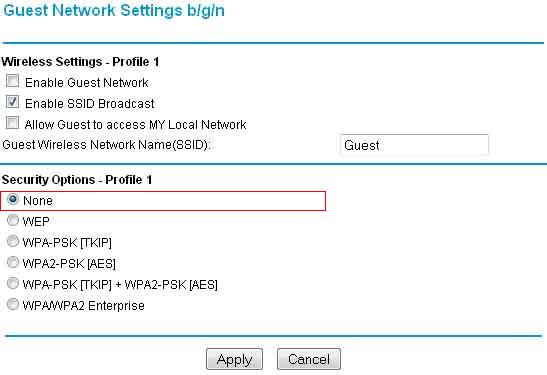
    • Disable by default the wireless security for your router or access point. You can Optionally encrypt the access to your Wireless Router or Access Point.
      (Example: NETGEAR-WLAN-Router)
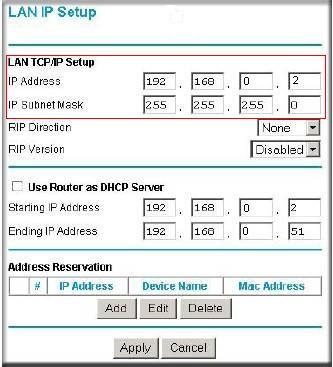
    • You will also have to specify a static IP addresse of the LAN port of your Wireless access point.You'll need to http in to your access point and assign the new IP address "192.168.0.2" by XP/Vista or "192.168.137.2" by Win7/8/10.
      (Example: NETGEAR-WLAN-Router)
    • Subnet mask: 255.255.255.0
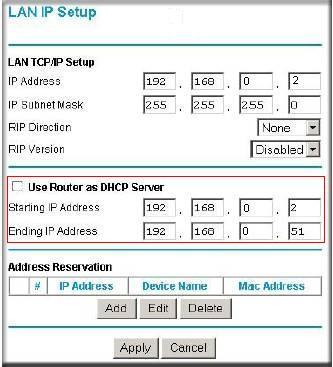
    • If you use a wireless router make sure to disable DHCP-Server. You'll need to http in to your wireless router and manually disable the DHCP-Server.
      (Example: NETGEAR-WLAN-Router)

Importanti dito is yung  Source ng Internet ay hindi 192.168.0.1 or 192.168.137.1 , dahil sa ICS  yung taga bato dapat ng internet ang siyang  may IP   192.168.137.1 example dito is yung adhoc or WLAN2 192.168.137.1 siya. WLAN naman is naka konek sa modem kong SmartBro kaya 192.168.15.7 siya.


Check This post how to Create Adhoc and about ICS
http://www.blogmytuts.net/2015/05/how-to-create-wireless-ad-hochotspot-on.html


Shared  over LAN , from WLAN to LAN

ROUTER SETTING  DISABLED DHCP SERVER
 (KASI PAG NAKA ON YUNG DCHP SERVER WALA KA CONTROL DI NAGANA YUNG REDIRECT SA LOGIN PORTAL KAYA NAKAKA BROWSE AGAD YUNG CLIENT )


4. Here, we’re going to enable a simple test login to verify the connection works. Click on the Edit menu -> Hotspot Configuration -> Access, then click the blue Advanced setting button. Tick “Enable guest-login”, adding a password is optional, click Close.


5. Like the previous hotspot software you need to now go to a device which can connect to the hotspot, such as another computer or tablet, connect to it , and then try to open a webpage. You should be greeted with the MyHotspot default login page…  or Type on your browser this IP address 192.168.137.1


Management 

MyHotspot provides you with a table overview containing all internet sessions on you WIFI-Hotspot. You can use this manager to end a internet session.


Pricing  Go to Edit Tariff and security  Change the Value like on this image. Just edit the Defaults.


  I suggest create a tariff for each promo or plan separate  per time or per MB bandwidth limit tariff.


QOS or Bandwidth  management


Example per Hour Tariff with  required  credit to use...

Tariff with Bandwidth Limit with required credit to use...  ( you must select billing system below)


Create Prepaid Code


Or I suggest the prepaid expired in the number of day after first login


NOTE : Create Prepaid base on the Tariff and number of credits required for that Tariff ( para iwas lito or confusion)


Hotspot Configuration

Here you can customize your login portal page set Free Website Free Login via social network  and Firewall etc..

MyHotSpot is setup to work with tariffs and payments which is fine if that’s what you want, more problematic if you just want to use access logins for time or bandwidth usage. What you will need to do is go to Edit -> “Tariffs and Security” and set all tariff rate options to zero money and then create a user from there. Once set correctly, it does work quite well. The icons down the left of the main window will show the log and information about who’s connected and duration/traffic used.


Para sa Free WIFI siyempre dapat i limit yung  gawin nyo 1 per day (limit the Free WiFi usage per user..


Server Configuration

wala naman masiyadong gagalawin dito  yung currency Php or  printer lang..

On Firewall you can Block any port Example Clash of Clan TCP port 9339  then Disable it.


NOTE: If the Login Page is not working it means you have programs already using port 80, I suggest use a newly reformat PC or Laptops if you want to use this..

UPDATE:  Today  August 11, 2015  I tested it on Windows 10 and it works!!


You may also want to read:

Globe myBusiness WiFi HOTSPOT With Ticketing Bill System

How To Create Wireless ad hoc/Hotspot on your Laptop without any Software on Windows


Trouble Shooting:
No Internet connection I suggest use LAN to LAN connection ------------you can buy a USB LAN card if you don't have  2  LAN on your PC or Laptop.

Supported searches :
◾Free Hotspot
◾Free WiFi Hotspot


Sunday, May 31, 2015

Virtual Mouse using OpenCV's Mean shift Algorithm

Hand tracking and mouse control. Implemented using OpenCV's Mean shift Algorithm. Features supported : Left click and Drag/Drop .

Samsung is using this in their Smart TV now, at least it looks real similar.

This Virtual Mouse project by r5rejeet shows us how OpenCV can be used to interface the camera image and process it into a HMI device. You can move the mouse pointer around the screen by moving your open hand around, you can click by simply closing your hand. This allow for a surprisingly good looking gesture interface.


OpenCV  ( http://opencv.org/ )is released under a BSD license and hence it’s free for both academic and commercial use. It has C++, C, Python and Java interfaces and supports Windows, Linux, Mac OS, iOS and Android. OpenCV was designed for computational efficiency and with a strong focus on real-time applications. Written in optimized C/C++, the library can take advantage of multi-core processing. Enabled with OpenCL, it can take advantage of the hardware acceleration of the underlying heterogeneous compute platform. Adopted all around the world, OpenCV has more than 47 thousand people of user community and estimated number of downloads exceeding 9 million. Usage ranges from interactive art, to mines inspection, stitching maps on the web or through advanced robotics.