



http://gpass1.com/gpass/download-en
http://gardennetworks.org/download
4 in 1 Software
https://www.torproject.org/download/download.html.en
Stablizer
http://ultra1/ultrasurf.htm
TOR++

download link: TOR++.exe - 4shared.com - online file sharing and storage - download
read updates below
Many option for TOR combination.
Portable no .net framework needed.
Very easy for establishing connection on TOR network.
Q: What is TOR++ ?
A: Tor++ is a combination of 4 main tunneling software such as Polipo, Privoxy, Gpass, and Gtunnel
which using the TOR engine to access the internet through TOR network.
Q: how to use it?
A:
* Download tor++
* Connect your PC in your ISP.
* Execute tor++, and wait until it build a TOR circuit.
* And now you can deploy the embedded tunneling software.
Q: How do I configure my browser.
A: Configuring your web browser is depend on what tunneling sw you've depoyed.
PRIVOXY 127.0.0.1:8000
POLIPO 127.0.0.1:8000
GPASS 127.0.0.1:8000
GTUNNEL 127.0.0.1:8081
Proxifier Directly No need
Note: I assigned privoxy, polipo and gpass on the same port so that it would be easy for us to switch if we wanted. When you deploy GTUNNEL you dont need to configure your browser it's automatically configure and run browser for you.
Q: How about proxifier?
A: Running Proxifier is optional, if you dont want to configure your browser manualy then
* Run Proxifier as relay - you can use proxifier to tunnel you programs (AV, YM, amfrog, etc) on deployed tunneling sw.
Programs <--> Proxifier <--> Gpass/Polipo/Privoxy/Gtunnel <--> Tor <--> Internet
* Run Proxifier Directly - you can use proxifier to tunnel you programs (AV, YM, amfrog, etc) on TOR network directly.
Programs <--> Proxifier <--> Tor <--> Internet
Note: Source files will be extracted at C:\FBT. [kung gusto nyo likutin setting]
Pls check for the bug.
UPDATES:
===========================================
Para sa mga di makapag-paconnect ng tor.
* synchronize mo date and time mo.
* check mo firewall settings, and other firewall services na nagrurun sa pc mo..
Download link: tor.zip - 4shared.com - online file sharing and storage - download
certificate, descriptor, and consensus ng PC ko laman nyan.. running win7.. extract mo lang..
* copy mo yung mga lamang file. lagay mo sa directory nato "C:\Users\%user_name_mo%\AppData\Roaming\tor" overwrite mo lahat and make sure hindi running tor++ mo..
* then run mo ulit ung tor++ dapat 80% agad bootsrapped nya.
====================================
Update [Bug fix] 10-07-10
Download link:
TOR++_5.exe - 4shared.com - online file sharing and storage - download
TOR++.exe
* Ctrl + V to paste download link at mydownloader input box.
* Separated Ping monitoring.
* Remove "Change exit node" (di naman nagagamit.. hhehe)
http://gardennetworks.org/download
4 in 1 Software
https://www.torproject.org/download/download.html.en
Stablizer
http://ultra1/ultrasurf.htm
TOR++
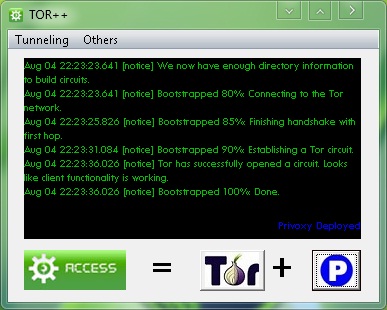
download link: TOR++.exe - 4shared.com - online file sharing and storage - download
read updates below
Many option for TOR combination.
Portable no .net framework needed.
Very easy for establishing connection on TOR network.
Q: What is TOR++ ?
A: Tor++ is a combination of 4 main tunneling software such as Polipo, Privoxy, Gpass, and Gtunnel
which using the TOR engine to access the internet through TOR network.
Q: how to use it?
A:
* Download tor++
* Connect your PC in your ISP.
* Execute tor++, and wait until it build a TOR circuit.
* And now you can deploy the embedded tunneling software.
Q: How do I configure my browser.
A: Configuring your web browser is depend on what tunneling sw you've depoyed.
PRIVOXY 127.0.0.1:8000
POLIPO 127.0.0.1:8000
GPASS 127.0.0.1:8000
GTUNNEL 127.0.0.1:8081
Proxifier Directly No need
Note: I assigned privoxy, polipo and gpass on the same port so that it would be easy for us to switch if we wanted. When you deploy GTUNNEL you dont need to configure your browser it's automatically configure and run browser for you.
Q: How about proxifier?
A: Running Proxifier is optional, if you dont want to configure your browser manualy then
* Run Proxifier as relay - you can use proxifier to tunnel you programs (AV, YM, amfrog, etc) on deployed tunneling sw.
Programs <--> Proxifier <--> Gpass/Polipo/Privoxy/Gtunnel <--> Tor <--> Internet
* Run Proxifier Directly - you can use proxifier to tunnel you programs (AV, YM, amfrog, etc) on TOR network directly.
Programs <--> Proxifier <--> Tor <--> Internet
Note: Source files will be extracted at C:\FBT. [kung gusto nyo likutin setting]
Pls check for the bug.
UPDATES:
===========================================
Para sa mga di makapag-paconnect ng tor.
* synchronize mo date and time mo.
* check mo firewall settings, and other firewall services na nagrurun sa pc mo..
Download link: tor.zip - 4shared.com - online file sharing and storage - download
certificate, descriptor, and consensus ng PC ko laman nyan.. running win7.. extract mo lang..
* copy mo yung mga lamang file. lagay mo sa directory nato "C:\Users\%user_name_mo%\AppData\Roaming\tor" overwrite mo lahat and make sure hindi running tor++ mo..
* then run mo ulit ung tor++ dapat 80% agad bootsrapped nya.
====================================
Update [Bug fix] 10-07-10
Download link:
TOR++_5.exe - 4shared.com - online file sharing and storage - download
TOR++.exe
* Ctrl + V to paste download link at mydownloader input box.
* Separated Ping monitoring.
* Remove "Change exit node" (di naman nagagamit.. hhehe)


