This is default featured slide 1 title

Go to Blogger edit html and find these sentences.Now replace these sentences with your own descriptions.

This is default featured slide 2 title

Go to Blogger edit html and find these sentences.Now replace these sentences with your own descriptions.

This is default featured slide 3 title

Go to Blogger edit html and find these sentences.Now replace these sentences with your own descriptions.

This is default featured slide 4 title

Go to Blogger edit html and find these sentences.Now replace these sentences with your own descriptions.

This is default featured slide 5 title

Go to Blogger edit html and find these sentences.Now replace these sentences with your own descriptions.

Saturday, July 14, 2012

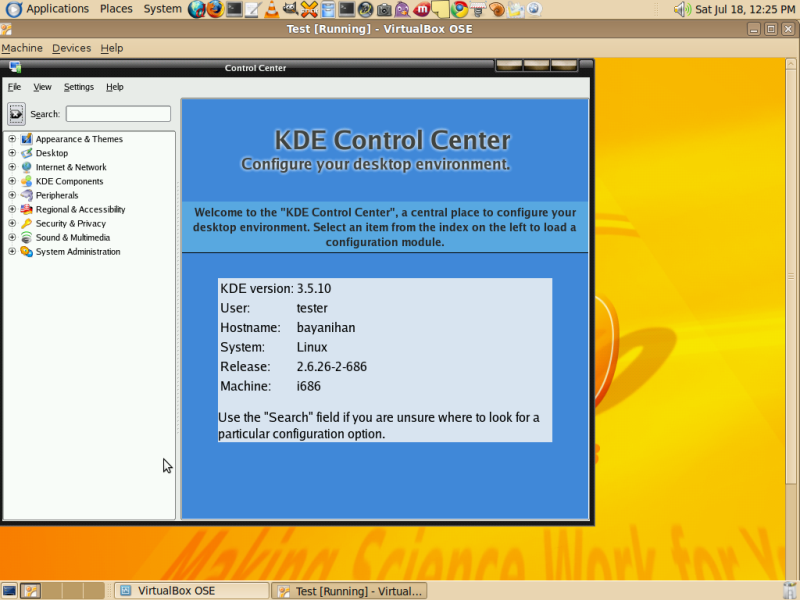
Bayanihan 5 Desktop: Kalumbata "Pinoy Operating Sytem"


This edition has the following features:
  • New graphical installer
  • Integrated office productivity applications, web browser, antivirus, CD/DVD burning tool, firewall utility, and many more!
  • Improved out-of-the-box support for various wireless devices, peripherals and printers, as well as plug-and-surf capability for popular 3G wireless devices
Minimum hardware requirements:
  • 32-bit:
    • at least 500MHz Pentium-class processor
    • at least 256MB RAM
    • at least 5GB hard disk space
    • monitor with at least SVGA resolution
    • standard keyboard and mouse
  • 64-bit:
    • at least 1GHz 64-bit-capable processor (AMD64 or EM64T)
    • at least 1GB RAM
    • at least 5GB hard disk space
    • monitor with at least SVGA resolution
    • standard keyboard and mouse
Download:

Just Been Paid


JustBeenpaid! Mission Statement

The mission of JustBeenpaid! is threefold:
  1. To provide the means for the "98%" (who typically struggle to earn money online) with the easiest and most reliable ways to earn money online;
  2. To provide moneymaking programs that enable participants to improve their money-handling skills;
  3. To provide products and services that enable members to transform themselves into "higher-level performers" who become 10-100 times as proficient, effective, and successful in all areas of their lives.

First You need a Payza Account (formally Alertpay)

click it below


Register Create a JBP (Just Been Paid)
click it below


banner

Friday, July 13, 2012

How to Boost Your Download Speed

Hello another tutorial for speed download seeker I tried it on a computer shop that was so slow net Digitel net on a rainy season.


1. Go to your Device Manager and find COM1 right click  it Go to properties. and a Dialog box will appear.


2. Go to port setting and change it to 128000 bits per second. now save!!


ok thats all now side effects..


Thursday, July 12, 2012

Tips on Assembling Computer

Tips on Assembling Computer

In Computer parts latest Specs are cheaper than the old item. So its better to change the unit than to upgrade it, and it is easy to find replacement parts if your unit crash. Old Specs are too expensive because of out of stock its hard to get one (Face-out).

1. Take a List

List the Specs you want to built, if you have a Good Hard drive you can still used it.

This are the basic part that must match each other.
  • Processor
  • Motherboard
  • RAM

2. Canvas

Every computer store don't have the same price of item some have cheaper price then the other store.


 You can check my post here for retail price
http://blogmytuts.blogspot.com/2012/07/enigma-retail-price.html

Ice Gloves for Touchscreen

In cold country accessing touch screen is impossible not till Touch Gloves invented.

Touchscreens use a capacitive system that allows them to "feel" the electric charge in the user's fingertips. Wearing normal gloves shields that charge from the sensors in the touchscreen.

The solution? "Touch Gloves" manufactured with a special textile covering the fingertips that allows the body's electric field free access to your tablet's touchscreen.
Touch Gloves were exhibited and demonstrated at the 2010 Tokyo International Gift Show Fall 2010. The gloves are designed, manufactured, and sold by Alta and were originally targeted at salespeople and employees whose work often took them outdoors in winter.

Here's a video from DigInfo that shows Touch Gloves in action at the Show:


Prepare to pay 1,700 yen (about $20.50) for the patterned Touch Gloves and just 1,500 yen (about $18.00) for the plain ones. (via Japan Probe and DigInfo

Tuesday, July 10, 2012

Computer Zombie

If you notice  I don't have a post  cuz I got sick.. I have a little sleep, I need a rest.

Having Less Sleep is really a Bad thing...

Nocturnal in short having a lots of coffee..


EDIMAX BR-6258n 150Mbps Wireless Broadband Nano Router

BR-6258n 

150Mbps Wireless Broadband Nano Router

Compatible:   

n150, iOS, Android, Green

  • Compatible with the 802.11n standard, with data rates up to 150Mbps
  • Built-in hardware WPS (Wi-Fi Protected Setup) button
  • Supports WISP (wireless ISP) connection mode
  • Includes EZmax multi-language setup wizard
  • Supports WMM, WEP,  WPA, WPA2, DDNS, QoS, IP/MAC filter, DMZ, and virtual server


Overview


Miniature, Energy-Efficient, Space-Saving, and Stylish
The BR-6258n is a miniature, energy-efficient, and space-saving wireless broadband router that is designed with pure stylishness. But this stylish router is not just about the looks, it has all the features that make it versatile and an extraordinary performer.
True Flexibility and Convenience
With both a WAN port and a LAN port, the BR-6258n gives users the flexibility of using it as either a router or a wireless adapter. The true convenience of the design lies in that the user only needs to make the appropriate cable connections and the BR-6258n will switch between the two modes automatically.
It’s as Fast as It Looks
The EDIMAX BR-6258n complies with IEEE 802.11b/g/n standards. Its wireless data transmission rate can reach up to 150Mbps and its signal coverage is 3 times greater than standard 802.11g/b routers.
WPS (Wi-Fi Protected Setup) Button
The BR-6258n has a built-in WPS button, which allows users to build a secure connection with a wireless network client with a simple click. There is no need to go through the hassle of configuring the complicated security settings manually.
IP Sharing, Virtual Server and DMZ
The NAT/NAPT function lets you share the Internet connection with up to 253 Intranet users. The virtual server and virtual DMZ functions also allow your internal servers to be accessed from the Internet.

Specifications

FUNCTIONS
HARDWARE INTERFACE
MANAGEMENT
  • Supports AP, AP Client, Bridge, Bridge+ WDS, and Universal Repeater modes
  • Port Triggering for special applications
  • DDNS and SIP
  • Virtual Server and DMZ hosting
  • MAC/IP filter and URL blocking
  • Static routing
  • UPnP architecture
  • VPN Pass-Through (IPSec/PPTP)
  • Schedule control
  • 1 x RJ-45 WAN port
  • 1 x RJ-45 LAN port
  • LED Indicators: Power, Wireless, WAN, LNK/ACT for LAN
  • Internal Antenna
  • WPS/Reset button
  • 12-language user interface
  • Supports Remote Management
  • System Status and Security Log(web interface)
  • Firmware upgradable
WAN
SECURITY
OUTPUT POWER & SENSITIVITY GAIN
  • Supports WISP connection mode
  • Supports RJ-45 cable/xDSL modems
  • WAN protocol: PPPoE, Static IP, PPTP, Dynamic IP,L2TP
  • NAT/NAPT IP Sharing
  • 64/128-bit WEP encryption and WPA-PSK,
    WPA2-PSK security
  • DHCP Server/Client
  • QoS for critical operations
  • SPI Anti-DoS Firewall
  • 11n: 15±1dBm,
    11g: 15±1dBm
    11b: 18±1dBm
  • 11n (40MHz)
    :-68dBm,
    11n (20MHz):
    -71dBm,
    11g: -74dBm,
    11b: -87dBm
MEMORY
INSTALLATION  KIT
HUMIDITY & TEMPERATURE
  • 4MB NOR Flash
  • 16MB SDRAM
  • Multi-language EZmax Setup Wizard
  • 10-90% (Non-condensing)
  • 0-45oC  
POWER ADAPTER
DIMENSIONS
CERTIFICATIONS
  • DC 5V, 1A
  • 51 (W) x  42 (D) x 17 (H) mm
  • CE, FCC
NETWORK SETUP DIAGRAM AND RELATED PRODUCTS
An example of how the BR-6258n can be setup:


Package Contents
1.BR‐6258n broadband router (1 pcs)
2.Quick installation guide (1 pcs)
3.CDROM with multi‐language setup wizard, multi‐language quick installation guide,and user manual (1pcs)
4.5V 1A USB power adapter (1 pcs)
5.Ethernet cable (1 pcs)
6.USB cable (1 pcs)

EDIMAX BR-6428nS 300Mbps Wireless Broadband Router

BR-6428nS


Compatible
 n300, iOS, Android, Green
300Mbps Wireless Broadband Router


  • Complies with wireless 802.11b/g/n standards
  • Wireless speed up to 12 times faster and coverage 5 times further
  • Built-in hardware WPS (Wi-Fi Protected Setup) button
  • Includes EZmax multi-language setup wizard for Internet connection, wireless settings, and firmware upgrade
  • Supports WMM, WEP, WPA, WPA2, DDNS, QoS, IP/MAC filter, DMZ, and virtual server

Overview


Green Technology
The EDIMAX BR-6428nS is designed with the latest green technology. By detecting the amount of wireless transference and supplying only the amount of power needed, this router is able to ensure the highest wireless performance while saving up to 66% of the usual power consumption. Even when it is in full loading, the BR-6428nS uses 50% less power compared to other non-green 300Mbps routers.
Wireless 802.11n Standard (data rates up to 300Mbps)
The EDIMAX BR-6428nS is a high-speed solution that complies with IEEE 802.11b/g/n standards. The latest wireless technology is built into this router to broaden its wireless coverage by 5 times. When it is connected to other 802.11n devices, the BR-6428nS can achieve transmission rates of up to 300Mbps. With such performance at such a competitive price, the BR-6428nS is truly the most cost-effective solution for any home or small business environment.
Shares a Single Internet Connection with up to 253 Clients
With NAT (Network Address Translation) capability, the EDIMAX BR-6428nS allows up to 253 wired or wireless clients to access a single Internet connection simultaneously.
Flexible WISP ( Wireless Internet Service Provider) Connection Mode
With WISP support, the BR-6428nS is able to access the Internet wirelessly from an ISP access point and turn it into a wired or wireless network for multiple users in your home or office.
Easy Setup with EZmax Multi-Language Wizard*
In addition to the built-in, multi-language user interface, a unique EZmax multi-language setup wizard is included in the installation CD. The animated and easy-to-follow instructions will guide you through the setup process and allow you to set up the router within minutes.
WPS (Wi-Fi Protected Setup) Button
The EDIMAX BR-6428nS has a one-click WPS (Wi-Fi Protected Setup) button to help you set up and activate a secure wireless network in a snap.


Specifications

FUNCTIONS
HARDWARE INTERFACE
MANAGEMENT
  • Supports AP, AP client, Bridge, Bridge+ WDS, and Universal Repeater modes
  • Port Triggering for special applications
  • DDNS and SIP
  • Virtual Server and DMZ hosting
  • MAC/IP filter and URL blocking
  • Static routing
  • UPnP architecture
  • VPN Pass-Through (IPSec/PPTP)
  • Schedule control
  • 1 x RJ-45 WAN port
  • 4 x RJ-45 Fast Ethernet LAN ports
  • LED Indicators: Power, Wireless, WAN, LNK/ACT for LAN
  • 3dBi fixed antenna x 2
  • WPS/Reset button
  • 12-language user interface
  • Supports Remote Management
  • System Status and Security Log (Web Interface)
  • Firmware upgradable
WAN
SECURITY
OUTPUT POWER & SENSITIVITY GAIN
  • Supports WISP connection mode
  • Supports RJ-45 cable/xDSL modems
  • WAN protocol: PPPoE, Static IP, PPTP, Dynamic IP, L2TP, Telstra Big Pond
  • NAT/NAPT IP sharing
  • 64/128-bit WEP encryption and WPA-PSK, WPA2-PSK security
  • DHCP Server/Client
  • QoS for critical operations
  • SPI Anti-DoS Firewall
  • 11n: 16±1dBm,
    11g: 16±1dBm
    11b: 18±1dBm
  • 11n (40MHz):
    -68dBm,
    11n (20MHz):
    -71dBm,
    11g: -74dBm,
    11b: -87dBm
MEMORY
INSTALLATION KIT
HUMIDITY & TEMPERATURE
  • 4MB NOR Flash
  • 16MB SDRAM
  • Multi-language EZmax Setup Wizard
  • 10-90% (Non-condensing)
  • 0-45oC
POWER ADAPTER
DIMENSIONS
CERTIFICATIONS
  • DC 5V, 1A
  • 134 (W) x 88 (D) x 26 (H) mm
  • CE, FCC


NETWORK SETUP DIAGRAM AND RELATED PRODUCTS
An example of how the BR-6428nS can be setup:

Monday, July 09, 2012

User Log-In Wimax BM622i

Globe updated their firmware on BM622i the default  user log in
user:user is no working anymore..


Here the new password..


How to Login


username: user
password: 0SlO051O (zero, capital S, small l, capital O, zero, five, one, capital O)

Product Class     BM622
Package Date     2011-06-27
also support these.


FAQ:

Question: What is the purpose of this firmware upgrade?
Answer: To improve/enhance modem security performance
Question: Which modems are qualified for firmware upgrade?
Answer: All Huawei BM622 with firmware version
?
BM622:
?
V100R001PHLC08B010SP30
?
V100R001PHLC08B015
?
V100R001PHLC08B022? 

BM622i: V100R001PHLC08B025

US EMBASSY GRAND AUCTION ON JULY 14 (9AM)


US EMBASSY GRAND AUCTION ON JULY 14 (9AM)


See poster for details...


Sunday, July 08, 2012

TIPS on Applying Internet Connection

TIPS on Applying Internet Connection.


1. Availability

Ask if which internet provider are available in your location, for broadband you can check your phone signal

2. Distance to their main server or Cell site.

 This is a very important to our internet connection speed. The shortest distance the better Bandwidth we can get and less pings. So if your to far to their main server or Cell site you can't receive the full length of your Bandwidth.

DSL 
Distance you must have at least 2 to 3 kilometer away from their transmitter or server. Logic here longer cable reduce electric current.( all most Provider all ready upgrade to Fiber Optic Cables)


Wireless Broadband
 Signal Strength 90 to 100% and RSSI at least you have 50% for better link quality.


3. Promo

Check if there is any promo to avail for badget conscious .