This is default featured slide 1 title

Go to Blogger edit html and find these sentences.Now replace these sentences with your own descriptions.

This is default featured slide 2 title

Go to Blogger edit html and find these sentences.Now replace these sentences with your own descriptions.

This is default featured slide 3 title

Go to Blogger edit html and find these sentences.Now replace these sentences with your own descriptions.

This is default featured slide 4 title

Go to Blogger edit html and find these sentences.Now replace these sentences with your own descriptions.

This is default featured slide 5 title

Go to Blogger edit html and find these sentences.Now replace these sentences with your own descriptions.

Saturday, February 09, 2013

How to Access Admin for Blank WAN Mac Wimax

I have a  Blank WAN and  I cannot generate a password for admin.
I cannot access Telnet too

I can only log in in user:user

This is  what a Blank WAN looks like.. first load in null


Then  I log out
first log in as  admin with guest password.


 Remove the highlighted  word .. remain  192.168.1.1/html/login.cgi?Username=admin&Password
Press Enter  and you have log in as admin


I upload  my working configs then I restore default and try to change mac .Telnet is accesible  still no luck .. I cannot turn back my WAN MAC.


 I guest the only solution is to flash but  I want to find solution on just a telnet  command  or any firmware update without jtag  the modem (flashing).


Windows XP Professional SP3

This is Windows XP Pro with SP3 (English). The serial is already entered and product is activated and updates work. This copy passes WGA verified  (05 September 2010).

Please say thanks for the sweet up. Just burn this ISO and it's ready to be installed. Clean legitimate version, no mods or anything.

SHARE WITH YOUR FRIENDS. SEND THEM HERE TO DOWNLOAD WINDOWS FOR FREE.


Windows XP Professional SP3 x32 June 2012 + SATA Drivers | 559 MB

This is the original Windows XP Professional SP3 (32-bit) ISO from Microsoft. Including Microsoft updates till 13.6.2012 Internet Explorer 8, Windows Media Player 11 and SATA drivers.

- This release is the best you could find on the net, because it's just simple:
* NO tweaks or add-ons.
* NO additional programs and software added.
* NO graphics, scripts and wallpapers added or changed.
* NO serial needed during installation, the key is already inserted.
* It's just the original image from Microsoft except updates, IE8, Adobe Flash Player (11.3.300.257) and SATA drivers!
* Windows Messenger, MSN Explorer and Internet Explorer 6 were removed.

- System requirements:
* Pentium 233-megahertz (MHz) processor or faster (300 MHz is recommended).
* At least 64 megabytes (MB) of RAM (128 MB is recommended).
* At least 1.5 gigabytes (GB) of available space on the hard disk .
* Video adapter and monitor with Super VGA (800 x 600) or higher resolution.

- Hashes of ISO file:
* CRC32: 823C508C
* MD5: 29B3DF59C0246F51F38D481A41235E37
* SHA-1: 3A1060E40BDD985ACFA01FF1D8B13005A15442DF

How To Use:
- Burn ISO to DVD & Install
- Enjoy!!
Direct Link it means its resume able. Just skips ads in 5 second
Download  Source: http://wehaslinks.com


http://adf.ly/844647/xpsp3


Disclaimer:  ISO file is not hosted  here  suspend operations of WeHasLinks due to the increasing risk of hosting such content

You may also like to read :


Making a Bootable Windows XP in USB

My windows XP crash  I don't have working  CD  all my cd have scratch  I only have Win7  on my USB . Ihaving trouble with Win7 installed in my Vintage Laptop lol..
and  I have no working CD for it so I download on Google. ( I mean search ).

I'm don downloading a windows XP with service pack 3

This what I did
1.Format my  2 Gig Kingston with NFTS format,
 In Windows 7 you have this option just right click then click format choose system file, but if you have XP you can try the  hp tools.


 2. Mount your ISO (windows image) into a Virtual Drive like alcohol or  magic disc.
Try this link  http://www.magiciso.com/tutorials/miso-magicdisc-overview.htm 


3. Use WinSetupFromUSB You can find link here http://blogmytuts.blogspot.com/2011/10/create-bootable-usb-drive.html
  • Browse your Virtual Drive mounted with Windows XP
  • Browse your USB drive
  • Click Go or Start


 Now its copying your Windows XP to your USB drive wait till it Finish


 TAKE NOTE what this pop NOTE says   Formatting using USB is  2 part


Inside your USB and the System File Format is NTFS for fast transferate during installation.


4. Set your First Boot on Bios your USB drive other is on Removable  other are on the Hardrive if you see a + on your harddrive click on you  it will see your USB there make it on first boot. Press F10 to save setting.

Visit this post  how to setup USB boot on BIOS
http://blogmytuts.blogspot.com/2012/06/bootable-flash-drive.html

OK this is the Actual Boot  from USB

First Part 1
( is where you reformat your Hard drive and Creating Partition)

 Second Part2 
(Windows GUI Installation)


 NOTE: Trouble missing file on first part I encounter it to  the solution is uplug your USB and replug it again and press ENTER to resume.


Google Doodle Game for Chinese year of the Water Snake

In Google Home  you will notice this new Google its playable user can enjoy this Doodle game its like playing SNAKE.


Game KEY  use Keyboard Arrow Key to Play


 Enjoy Playing..

-blogmytuts


Thursday, February 07, 2013

Huawei Wimax Bm622 Package Date 2011 Change MAC -Late Post

This is my late post reconnect wimax bm622 package date 2011
+Eric Hunt  +Erwin Xnoes apriliago +Adam Gibbs +WIRED +with WiMAX 

1.First Download  admin password generator  by heartilly83
DOWNLOAD LINK
open it to generate a password


2. enable the telnet on acl click apply


3. go  run  type telnet 192.168.1.1

Log in
user: Firefly
Password: $P4mb1h1r4N4m4nT0!! 
  
type this command to change mac
 
xiugai allmacdizhi XX:XX:XX:XX:XX:XX  ( xx is your mac press Enter)

 Type: save  (Press Enter)

Type: board reboot (Press Enter )

I recommend copy paste user and password ^^ 


For auto vbs script for Telnet so you don't have to type command. 
just copy the scripts below on a new notepad EDIT the XX  that is your working MAC.
then save anyname.vbs  
open your created vbs on just  1 click you can change  mac.

Set cloner = CreateObject("WScript.Shell")
cloner.run"cmd"
WScript.Sleep 500

cloner.SendKeys"telnet 192.168.1.1"
cloner.SendKeys("{Enter}")
WScript.Sleep 500

cloner.SendKeys"Firefly"
cloner.SendKeys("{Enter}")
WScript.Sleep 500

cloner.SendKeys"$P4mb1h1r4N4m4nT0!!"
cloner.SendKeys("{Enter}")
WScript.Sleep 500

cloner.SendKeys"xiugai allmacdizhi XX:XX:XX:XX:XX:XX"
cloner.SendKeys("{Enter}")
WScript.Sleep 500

cloner.SendKeys"save"
cloner.SendKeys("{Enter}")
WScript.Sleep 3000

cloner.SendKeys"board reboot"
cloner.SendKeys("{Enter}")
WScript.Sleep 500

cloner.SendKeys("{Enter}")
WScript.Sleep 30000

cloner.SendKeys"exit"
cloner.SendKeys("{Enter}")
WScript.Sleep 45000

 
 NOTE: vbs script are editable and you can edit it for other telnet command the

Update NOTE: some connecting only after board reboot log in as admin
manualy change the security setting  if your familiar to bm622i

Image  of a "board reboot" end command

  
Succes Change Mac
 

 Connecting Only.........


Board Reboot doesn't change the default security you can see on this image NAI 002568  you need to generate  this from you new mac (my example max is 10c6


ACL Telnet is unchange still enable


After Changing NAI User ID User Password


 "RESTOREDEF " Ending Command


 VBS Scripts

Set cloner = CreateObject("WScript.Shell")
cloner.run"cmd"
WScript.Sleep 500

cloner.SendKeys"telnet 192.168.1.1"
cloner.SendKeys("{Enter}")
WScript.Sleep 500

cloner.SendKeys"Firefly"
cloner.SendKeys("{Enter}")
WScript.Sleep 500

cloner.SendKeys"$P4mb1h1r4N4m4nT0!!"
cloner.SendKeys("{Enter}")
WScript.Sleep 500

cloner.SendKeys"xiugai allmacdizhi 10:C6:1F:CE:32:9F"
cloner.SendKeys("{Enter}")
WScript.Sleep 500

cloner.SendKeys"save"
cloner.SendKeys("{Enter}")
WScript.Sleep 3000

cloner.SendKeys"restoredef"
cloner.SendKeys("{Enter}")
WScript.Sleep 500

cloner.SendKeys("{Enter}")
WScript.Sleep 30000

cloner.SendKeys"exit"
cloner.SendKeys("{Enter}")
WScript.Sleep 45000


Connnected agad


Update:
  Used  putty to change mac instead  decrypting  another password for  admin to log in to the WEB GUI to Enable Telnet. Execute command in this way is much easy. ;)


 Download Putty

Download PuTTY


PuTTY is an SSH and telnet client, developed originally by Simon Tatham for the Windows platform. PuTTY is open source software that is available with source code and is developed and supported by a group of volunteers.

VIEW my tutorial -->>/change-mac-on-disabled-telnet-via-putty


Upgrading Huawei Wimax Bm622i Firmware 2010 to 2011

I have no idea what to to this day   so Im thinking upgrading my 2010 bm622i Package Date to 2011.

UPS: Notice my browser respond faster before and it not hang even i have several tab..
DOWN: Because of its high security level some sites  like https are having error on port 80 or Apache server.


Warning: You should done this with laptops and with a UPS or make sure no power interrupt, if upgrade failed you modem will be damage and result you will need to flash it.

DOWNLOAD
Globe Wimax Upgrade


From B025 to B030

 Unplug your Modem then plug it again


After you see this pics below click modem reboot


Check the WEB Interface


Login sa modem
user:  user
Pass: 0SlO051O


 Other Trick if you want to used VIP mac using  user account only..
login as user first BM622I 2011 click the fallowing link
 
http://192.168.254.1/html///wimax/scanset.asp <- Frequency
http://192.168.254.1/html///wimax/security.asp<- Nai, User & Password and Domain
http://192.168.254.1/html//application/alg.asp<- ALG Settings


Other admin  link added
 just paste  after  192.168.254.1/html/

Admin_0 = new MenuItem(eval('Status'));
Admin_0_0 = new MenuItem(eval('Device0'));
Admin_0_0_0 = new MenuItem(eval('Device1'),'../status/deviceinfo.asp');
Admin_0_1 = new MenuItem(eval('WAN'));
Admin_0_1_0 = new MenuItem(eval('Status0'),'../status/internetstatus.asp');
Admin_0_2 = new MenuItem(eval('LAN'));
Admin_0_2_0 = new MenuItem(eval('Internet'),'../status/internet.asp');
Admin_0_3 = new MenuItem(eval('VOIP'));
Admin_0_3_0 = new MenuItem(eval('VoIP0'),'../status/voipinfo.asp');
Admin_0_4 = new MenuItem(eval('WiMAX'));
Admin_0_4_0 = new MenuItem(eval('WiMAXStatus'),'../wimax/estate.asp');
Admin_0_4_1 = new MenuItem(eval('ScanInfo'),'../wimax/scanInfo.asp');
Admin_1 = new MenuItem(eval('Basic'));
Admin_1_0 = new MenuItem(eval('WAN'));
Admin_1_0_0 = new MenuItem(eval('WAN'),'../ntwkall/wan.asp');
Admin_1_1 = new MenuItem(eval('LAN'));
Admin_1_1_0 = new MenuItem(eval('DHCP'),'../ntwkall/dhcp.asp');
Admin_1_2 = new MenuItem(eval('VOIP'));
Admin_1_2_0 = new MenuItem(eval('VoIpAccount'),'../voip/sipbasic.asp');
Admin_1_2_1 = new MenuItem(eval('VoIpServer'),'../voip/sipserver.asp');
Admin_1_2_2 = new MenuItem(eval('SpeedDial'),'../voip/sipspeeddial.asp');
Admin_2 = new MenuItem(eval('Advanced'));
Admin_2_0 = new MenuItem(eval('FireWall'));
Admin_2_0_0 = new MenuItem(eval('FireWall'),'../security/firewall.asp');
Admin_2_1 = new MenuItem(eval('NAT'));
Admin_2_1_0 = new MenuItem(eval('ALG'),'../application/alg.asp');
Admin_2_1_1 = new MenuItem(eval('DMZ'),'../application/dmz.asp');
Admin_2_1_2 = new MenuItem(eval('PortMapping'),'../application/portmapping.asp');
Admin_2_1_3 = new MenuItem(eval('PortTrigger'),'../application/porttrigger.asp');
Admin_2_2 = new MenuItem(eval('QoS'));
Admin_2_2_0 = new MenuItem(eval('QoS'),'../network/qos.asp');
Admin_2_3 = new MenuItem(eval('VLAN'));
Admin_2_3_0 = new MenuItem(eval('VLAN'), '../network/vlan.asp');
Admin_2_4 = new MenuItem(eval('SNTP'));
Admin_2_4_0 = new MenuItem(eval('SNTP'),'../ntwkall/sntp.asp');
Admin_2_5 = new MenuItem(eval('CWMP'));
Admin_2_5_0 = new MenuItem(eval('TR069'),'../network/tr069.asp');
Admin_2_6 = new MenuItem(eval('VOIP'));
Admin_2_6_0 = new MenuItem(eval('SipAdvanced'),'../voip/sipadvanced.asp');
Admin_2_6_1 = new MenuItem(eval('VoiceCodec'),'../voip/sipvoicecodec.asp');
Admin_2_6_2 = new MenuItem(eval('Voice'),'../voip/voiceadvanced.asp');
Admin_3 = new MenuItem(eval('Maintain'));
Admin_3_0 = new MenuItem(eval('Device0'));
Admin_3_0_0 = new MenuItem(eval('Reset'),'../management/reset.asp');
Admin_3_0_1 = new MenuItem(eval('Firmware'),'../management/firmware.asp');
Admin_3_1 = new MenuItem(eval('Diagnose'));
Admin_3_1_0 = new MenuItem(eval('Diagnose'),'../management/diagnose.asp');
Admin_3_2 = new MenuItem(eval('LOG'));
Admin_3_2_0 = new MenuItem(eval('LOG'),'../management/logcfg.asp');
Admin_3_2_1 = new MenuItem(eval('LOG0'),'../management/logview.asp');
Admin_4 = new MenuItem(eval('WiMAX'));
Admin_4_0 = new MenuItem(eval('Security'));
Admin_4_0_0 = new MenuItem(eval('Security'),'../wimax/security.asp');
Admin_4_0_1 = new MenuItem(eval('Certificate'),'../wimax/certificate.asp');
Admin_4_1 = new MenuItem(eval('Scanset'));
Admin_4_1_0 = new MenuItem(eval('Scanset'),'../wimax/scanset.asp');
Admin_5 = new MenuItem(eval('Wizard'),'',false);
Admin_5_0 = new MenuItem(eval('Wizard'),'',false);
Admin_5_0_0 = new MenuItem(eval('Wizard'),'../wizard/wizard.asp');
Admin_6 = new MenuItem(eval('Help'),'',false);
Admin_6_0 = new MenuItem(eval('Help'),'',false);
Admin_6_0_0 = new MenuItem(eval('Help'),'/lang/help_content.html');  


Reconnect Your DSL Internet or Upgrade Fast DSL Account

NOTE:This tutorial is for educational purpose  about vulnerability of some Internet Provider.

If  you have freshly disconnected DSL it can be reconnect or you can upgrade your speed your 512Kbps to a Business Plan.

What you Need?
  • Modem  connected to a line ( If you don't have barrow to a friend )
  • IP Scanner
  • Mozilla Firefox (My Favorite)
  • Password Viewer  (Search on Google or Click here)


Step1.

Get your defaulty getway of  DSL Modem, to do this type CMD in RUN
type IPCONFIG/all
then you can see defaulty getway sample 192.168.1.1


 Note: To get default gateway  you must not have router , or look under your modem sticker you can see the printed user and password and default getaway.

Or  Visit my Full List of Common User and Pass --->>>http://blogmytuts.blogspot.com/2013/01/common-modemrouter-user-name-and.html

Default
username: user
password: user

username: admin
password: password

Internet Service Provider                         Brand                Username               Password

PLDT DSL/Fiber                       ZyXEL,Prolink,broaudtech                    adminpldt              1234567890
PLDT Fibr                                            Huawei                                         telecomadmin        admintelecom
PLDT                                                       "                                                 admin                    1234
Bayan DSL                                                 ZTE                                         admin                    bayandsl
Globe Broadband                            Prolink and Siemens                          Admin                  3UJUh2VemEfUtesEchEC2d2e

Globe ADSL                                  Aztech                                                admin/user              admin/user
                                                                                                                    user                       user

SmartMyBro                               Greenpacket?DV                                     smart                     smart                           
Sky Broadband                                                                               admin(leave it blank)        (leave it blank)
                                                                                                          (leave it blank)                (leave it blank)
Digitel DSL                                          Prolink                                         admin                      password


Step2
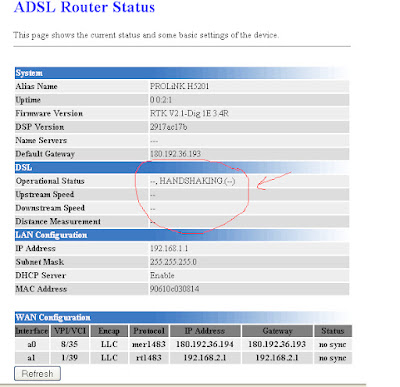
Open your Firefox Browser  Type your gateway  the log in. go to  adsl status .
Look for Default Gateway IP


Get the Default Gateway in this picture  180.192.36.193

NOTE:  A disconnected modem  Operational status is always Handshaking while a Connected Modem is  SHOWTIME!!


Step3
Download IP scanner put your  gateway to start scanning  DSL account.

 Download  it here  http://blogmytuts.blogspot.com/2013/02/angry-ip-scanner-or-simply-ipscan.html
How?
If my IP is 180.192.36.193


Start IP 180.192.36.0   END IP  180.192.36.255

Or a wild guest IP


All in BLUE at LIVE MODEM

STEP4
If your familiar in wimaxtol this is just the same you open the LIVE IP in your WEB Browser.
Log in - go to Interface setup


 Step5.

View the Password
"Viewing of password via browser".--->> search on google  keyword  JAVASCRIPT PASSWORD VIEWER, or go  click here , scroll down (see screenshot).

All you need is to add it bookmark..--->right click  link show password and select bookmark this link. (it's up to you if bookmark or toolbar)

VISIT: http://blogmytuts.blogspot.com/2013/05/how-to-show-password-in-asterisk-or-dot.html


Final Step
Now Lets go Back to the remote modem..
click your bookmark show passowrd


Password will pop out!!


Done!! you have reserve Internet Account some are hunting  5mbps account and sell them..

Screenshot by TIMMY. STEP 4 to 6 I did not  screen-shoot  my own account off course LOL.


You may also like to read: