This is default featured slide 1 title

Go to Blogger edit html and find these sentences.Now replace these sentences with your own descriptions.

This is default featured slide 2 title

Go to Blogger edit html and find these sentences.Now replace these sentences with your own descriptions.

This is default featured slide 3 title

Go to Blogger edit html and find these sentences.Now replace these sentences with your own descriptions.

This is default featured slide 4 title

Go to Blogger edit html and find these sentences.Now replace these sentences with your own descriptions.

This is default featured slide 5 title

Go to Blogger edit html and find these sentences.Now replace these sentences with your own descriptions.

Saturday, February 28, 2015

Create Blogger Sitemap Page

Sitemap of a blog helps the visitors to easily navigate the blog without going to each single post, this is like a Table of Contents. It helps the search crawlers to easily crawl our site and helps to translate our blog in search engines as well...

Just follow the simple steps given below.

    Go To Blogger >> Dashboard >> Pages
    Create New Page >> Blank Page
    Insert Page Title of Yours Choice.
    Go To HTML Tab


 Copy The Code Below and Paste

<style type="text/css">
#toc{
width:99%;
margin:5px auto;
border:1px solid #2D96DF;
-webkit-box-shadow:4px 4px 8px 2px rgba(0,0,0, 0.2);
-moz-box-shadow:4px 4px 8px 2px rgba(0,0,0, 0.2);
box-shadow:4px 4px 8px 2px rgba(0,0,0, 0.2);
}
.labl{
color:#FF5F00;
font-weight:bold;
margin:0 -5px;
padding:1px 0 2px 11px;
background:-moz-linear-gradient(right,#C2EAFE 0%,#055A85 40%);
background:-webkit-gradient(linear,left 10,right 80,color-stop(0.20,#055A85),color-stop(1,#C2EAFE));
border:1px solid #2D96DF;
border-radius:4px;-moz-border-radius:4px;
-webkit-border-radius:4px;box-shadow:3px 3px 1px #bbb;
-moz-box-shadow:3px 3px 1px #bbb;-webkit-box-shadow:3px 3px 1px #bbb;display:block;
}
.labl a{
color:#fff;
}
.labl:first-letter{t
ext-transform:uppercase;
}
.new{
color:#FF5F00;
font-weight:bold;
font-style:italic;
}
.postname{
font-weight:normal;
background:-moz-linear-gradient(right,#C2EAFE 0%,#fff 40%);
background:-webkit-gradient(linear,left 80,right 10,color-stop(0.60,#fff),color-stop(1,#C2EAFE));
}
.postname li{
border-bottom: #ddd 1px dotted;
margin-right:5px
}

</style>


<div id="toc">
<script src="https://googledrive.com/host/0ByNodV_m9cVLR0pmWFgwZ1NmdW8/" type="text/javascript"></script>
<script src="http://www.YOURBLOGDOMAIN.com/feeds/posts/default?max-results=9999&amp;alt=json-in-script&amp;callback=loadtoc">
</script></div>


Replace YOURBLOGDOMAIM.COM With Your Blog Domain.
Click "Publish" Button.
Done!!


 SAMPLE :  http://www.blogmytuts.net/p/blog-page.html


How to Setup Custom Domain on Blogger with Pangalan.com

Setting Up Blogspot With Your Costum Domain Name


WHAT IS DOMAIN?
Domain names are used to identify one or more IP addresses. For example, the domain name microsoft.com represents about a dozen IP addresses. Domain names are used in URLs to identify particular Web pages. For example, in the URL http://www.blogmytuts.net/p/blog-page.html, the domain name is blogmytuts.net

Because the Internet is based on IP addresses, not domain names, every Web server requires a Domain Name System (DNS) server to translate domain names into IP addresses.

Every domain name has a suffix that indicates which top level domain (TLD) it belongs to. There are only a limited number of such domains. For example:
gov - Government agencies
edu - Educational institutions
org - Organizations (nonprofit)
mil - Military
com - commercial business
net - Network organizations
ca - Canada


1.Create an account on Pangalan.com
2.Check if your domain name is available
Choose your domain 
Check the BOX click next
blogmytuts.net is P520


3.If you don't want to avail package click net or continue. (di ako nag avail dito kuripot ako haha saka di ko kailangan push email )


4.Fill up  the following


Choose your payment method click Continue , ( I Choose Paypal method for fast transaction)


Now Setup Domain on Blogger


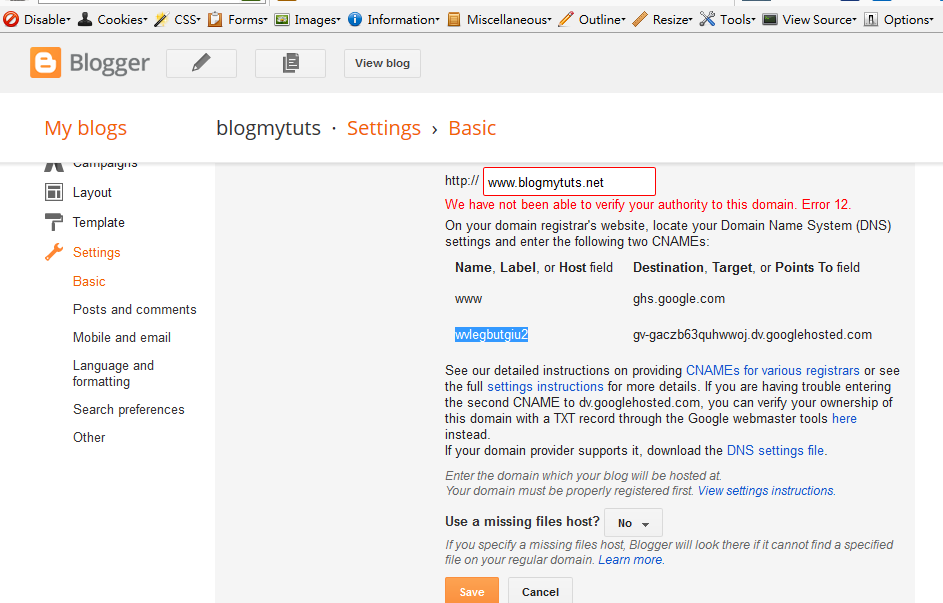
1.Go to blogger setting Publishing click Add custom domain input your domain name with www see example below click save


2. You will error message copy this message below you use this later... (gagamitin natin mamaya sa Pangalan dot com sa pag lagay ng DNS)


2. Verify  Domain Name System ( DNS )
Log in on pangalan.com  click  Tab All Domain then click your Domain


3. Find DNS Zone tab and click New Record


4. Add First CNAME  Name and Value this are from the step 2 (yung lumitaw sa blogspot na error)


5.Add Second CNAME   Name and Value (from step 2 yung sa blogspot error messages)


6.Create  A record  four different Google IPs which links to your naked domain to actual site.

use this  IPs  216.239.32.21 , 216.239.34.21, 216.239.36.21, 216.239.38.21

(kahit walang NAME.  yung IP lang saka nyo save bali apat yan gagawi nyo new record)


7.Finalizing the change of Domain

Go to blogger setting Publishing add your domain  check the redirect click SAVE your Done!!
Wala na pong error message dapat dito kung na Verify ng Tama sa  Pangalan Dot COM kapag may error pa  ulitin yung mga step sa itaas baka may mali kayong nagawa..


Thursday, February 26, 2015

Starting March 23, 2015 Google ban sexually explicit images graphic and videos

Starting March 23, 2015, you won't be able to publicly share images and videos that are sexually explicit or show graphic nudity on Blogger.
Note: We’ll still allow nudity if the content offers a substantial public benefit. For example, in artistic, educational, documentary, or scientific contexts.

Changes you’ll see to your existing blogs

If your existing blog doesn’t have any sexually explicit or graphic nude images or video on it, you won’t notice any changes.
If your existing blog does have sexually explicit or graphic nude images or video, your blog will be made private after March 23, 2015. No content will be deleted, but private content can only be seen by the owner or admins of the blog and the people who the owner has shared the blog with.


Settings you can update for existing blogs

If your blog was created before March 23, 2015, and contains content that violates our new policy, you have a few options for changing your blog before the new policy starts:
If you’d rather take your blog down altogether, you can export your blog as a .xml file or archive your blog's text and images using Google Takeout.

Effect on new blogs

For any blogs created after March 23, 2015, we may remove the blog or take other action if it includes content that's sexually explicit or shows graphic nudity as explained in our

source: https://support.google.com/blogger/answer/6170671?p=policy_update&rd=1


Monday, February 23, 2015

How to Apply Nuffnang ATM Card via Security Bank

Nuffnang Philippines since last year  implemented new policy. All payout must be deposited to bank accounts or pick up in the office.

Please be guided on procedures below:

1. Visit the nearest Security Bank Branch in your place.

Check Map here:  https://www.securitybank.com/map/


2. Fill up the form for opening Nuffnang ATM.

Please fill up the form (Cash Card Application-yung pang payroll) And this form will send to Security Bank Fort Bonifacio Infinity Branch.Here is the contact no. of Security Bank Fort Bonifacio Infinity Branch: 02-553-0933 & 553-0936 to assist you.

Make sure to write NUFFNANG PHILIPPINES (Employer/Business name)

3. Kindly inform Security Bank (bank where you will fill up your form) to send your Form at SECURITY BANK INFINITY TAGUIG BRANCH.  (Security Bank Fort Bonifacio Infinity Branch)

4. Security Bank Infinity Taguig Branch will process your atm and send it back to its original place. (bank where you will fill up your form it takes 3 weeks or 20 working days)


5. If you received your ATM email your account number to payout.ph@nuffnang.com  Payment will deposit  to your account.