This is default featured slide 1 title

Go to Blogger edit html and find these sentences.Now replace these sentences with your own descriptions.

This is default featured slide 2 title

Go to Blogger edit html and find these sentences.Now replace these sentences with your own descriptions.

This is default featured slide 3 title

Go to Blogger edit html and find these sentences.Now replace these sentences with your own descriptions.

This is default featured slide 4 title

Go to Blogger edit html and find these sentences.Now replace these sentences with your own descriptions.

This is default featured slide 5 title

Go to Blogger edit html and find these sentences.Now replace these sentences with your own descriptions.

Saturday, April 12, 2014

Power Up Your Mobile Device in 30 seconds


Now, if I say that your Smartphone will charge in just 30 seconds, then you definitely won’t believe it. But saying this won't be wrong, Israeli start-up claims to have created a battery that uses nanotechnology to charge your Smartphone in 30 seconds.
StoreDot unveiled the device Monday at Microsoft's Think Next Conference in Tel Aviv. The prototype charger is capable to charge your Smartphone 100% within few blinks of your eyes, all in about 30 seconds. It depends on bio-organic quantum dots that are nano in size, tiny conductive crystals that help enable nimble charging.
StoreDot is a Nanotechnology Research Company and came across the technology while creating biological semiconductors that can, among other things, store a charge, emit visible light and be used to produce high-capacity, or quick-charging, batteries.


Thursday, April 10, 2014

SK Hynix Developed the World’s First Highest Density 128GB DDR4 Module

Seoul, April 7, 2014 – SK Hynix Inc. (or ‘the Company’, www.skhynix.com) announced that it has developed the world’s first highest density of 128GB(Gigabytes) module based on 8Gb(Gigabit) DDR4 using its advanced 20nm class technology.


This module has double density compared to existing 64GB by taking advantage of TSV(Through Silicon Via) technology. This new product works at 2133Mbps and with a 64-bit I/O it processes up to 17GB of data per second. It also runs at ultra low-voltage of 1.2V which does at lower voltage than 1.35V of existing DDR3.

SK Hynix is expected to continuously maintain its technology leadership in the server DRAM market by providing the samples of the world’s first 128GB and 64GB modules built on 8Gb DDR4. The Company plans to start volume mass production of those from the first half of next year.

“The development of the world’s first 128GB DDR4 module has its significance in opening ultrahigh density server market” said Senior Vice President Sung Joo Hong, the Head of DRAM Development. “The Company will further strengthen its competitiveness in premium DRAM sphere with the development of high density, ultrahigh speed and low power consuming products” he added.

According to Gartner, server DRAM market will grow 37% in annual average until 2018 following expansion of mobile environment. Plus, the new interface DDR4 is expected to be certified by customers in this year and is anticipated to be commercialized regularly from 2015. Also, it is expected to be the main standard in the industry from 2016.

(source )


Mozilla's $25 Firefox Smartphone

A Mozilla reference phone, built with Spreadtrum's processor, that ultimately will hit the market as a $25 device for customers who don't have the funds for higher-end phones.  Alcatel , ZTE, and Huawei  also released smartphone and tablet with Firefox OS


BARCELONA -- Mozilla doubled down on its bet that low-end smartphones will give Firefox OS a place in the crowded mobile market, announcing partnerships Sunday that will bring $25 smartphones to the large number of people who can't afford high-end models like Apple's iPhone 5S and Samsung's Galaxy S5 that cost hundreds of dollars.
At the Mobile World Congress here, Mozilla announced a deal with Chinese chip designer Spreadtrum Communications that will mean Firefox OS smartphones will arrive in extremely cost-sensitive markets like India and Indonesia where people often buy phones from a bin in a store.
"We're working with them to break through the $50 barrier, which is hard," Mozilla Chief Technology Officer Brendan Eich told CNET. "This is going to be for a set of [sales] channels in Asia that do not involve operators," the carriers that in other parts of the world dominate distribution.
One company that plans to make and promote the phones is Indonesia-based Polytron. And Indonesian carriers Telkomsel and Indosat plan to sell the devices. Hands-on testing shows the cheap Firefox OS phones to be workable. "This is a price point currently out of the reach of Google and even the lowest-cost Android handset vendors. It pushes Firefox OS into feature-phone territory, potentially signaling the beginning of the end for the category," said Ovum analyst Nick Dillon in a statement.


Firefox OS takes on challenges
Today, Apple's iOS and Google's Android dominate the market for smartphones and tablets. Challengers like Microsoft's Windows Phone, Ubuntu Touch, WebOS, BlackBerry OS, and Samsung's Tizen have struggled to push these aside: it's hard to compete against an incumbent that's got millions of users, hundreds of thousands of apps, and few signs of the complacency that can open a door for challengers.
Firefox OS won't have an easy time of it. There's not as much money to be squeezed from low-end markets, so developers aren't as likely to pursue it as avidly. The Spreadtrum chipset will support only 2.5G Edge mobile networks that, while common in poorer parts of the world, are too slow for a lot of modern apps. And Google is pushing toward lower-end phones, with Android 4.4 memory-saving techniques that fit KitKat into phones with 512MB of RAM.
At the same time, though, Firefox is pushing, too. It uses the same ZRAM memory compression technique to halve its memory requirement to 128MB of memory, Eich said.
Getting down to $25 phones means Firefox OS will provide an alternative for people who'd otherwise buy a feature phone -- a model with a few built-in apps but not much more.
So Firefox has a chance there. But in the long run, to succeed, Firefox OS will need to push up-market, and it's not clear how Mozilla will succeed there with much stronger competition.


source:

Official Windows 8.1 Update now available for download

The new update can be downloaded straight from Windows Update for free. It comes with security and performance updates, as well as improvements that make Windows more convenient and familiar for users who use touch and mouse combo.


Some features of Windows 8.1 Update 1 include:
Power and Search buttons on the Start screen
All open and pinned apps appear in the taskbar
Access the taskbar from everywhere
Go to the desktop when you sign in, instead of Start
The Minimize button, Close button, and taskbar are more available with your mouse

 “It is a required update to keep your Windows 8.1 device current. Failure to install this Update will prevent Windows Update from patching your system with any future updates starting with Updates released in May 2014,” said one Microsoft representative.

Download Update 1 for Windows 8.1:

Windows 8.1 Update for x86 (KB2919355)
Windows 8.1 Update for x64 (KB2919355)
Windows Server 2012 R2 Update (KB2919355)

 In addition to Microsoft ending support for Windows XP today, the company in turn has made official its latest Windows 8.1 Update 1 that users can now begin downloading. Microsoft calls this update ‘mandatory’ for all users of Windows 8.1.

But here  I still manage to update my MSE on my XP

Wednesday, April 09, 2014

HUAWEI LTE CPE B593 4G Router Installation and Firmware Upgrade

HUAWEI B593 4G LTE Router InstallationQuick guide to get online with 4G router

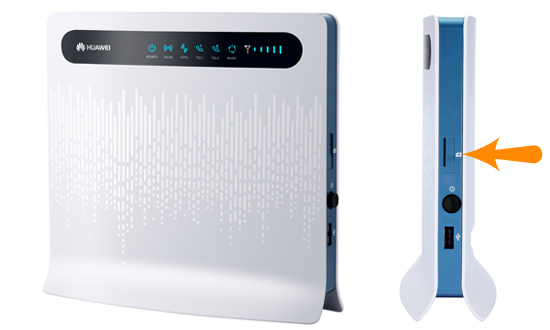
1)    You should start by inserting the SIM card and then plug the power adapter to the B593 4G router. SIM card must be inserted on the right side when looking at the front of the router. You can see how the SIM card slot in the LTE CPE B593. Power plug must be inserted behind the router.


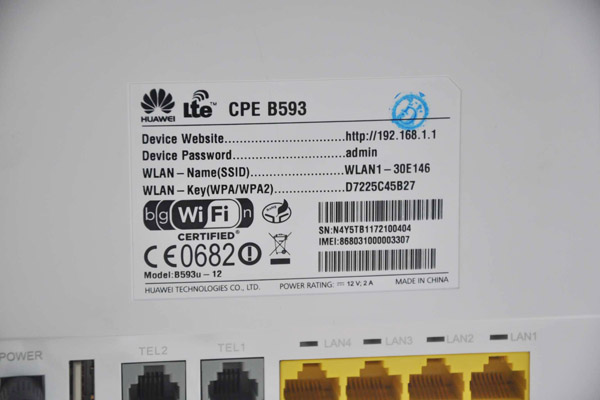
2) Now you need to connect the router to your computer via wireless network (WiFi). You will find the router’s name and network code on the sticker behind the router.
WLAN – Name (SSID) is the router’s name and WLAN – Key (WPA/WPA2) is the router’s wireless network password. When you first connect the router via WiFi, it would be necessary to enter the WLAN key and get connected.
If you experience problems connecting to the router with the information on the back of the router, this information may be changed. Press reset on the side of the router with a ball pen for about 20 seconds and try again.


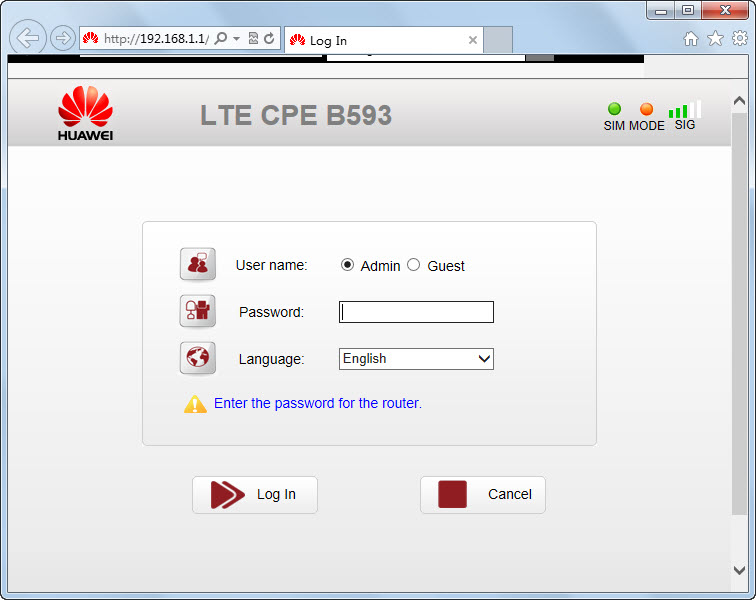
3) Once connected, open your Internet browser (eg Internet Explorer, chrome or Safari) and in the address bar, type the router’s address http://192.168.1.1 . It’s the device website on the label.


The default language is English, but you can choose your preferred language. Username is admin and password admin in lowercase. You can also find both the router’s address and password on the sticker behind the router.

4) The router will ask you to change the password when you login. You can ignore it. Your router is already secured with the unique network code that you entered earlier in order to connect to the router.

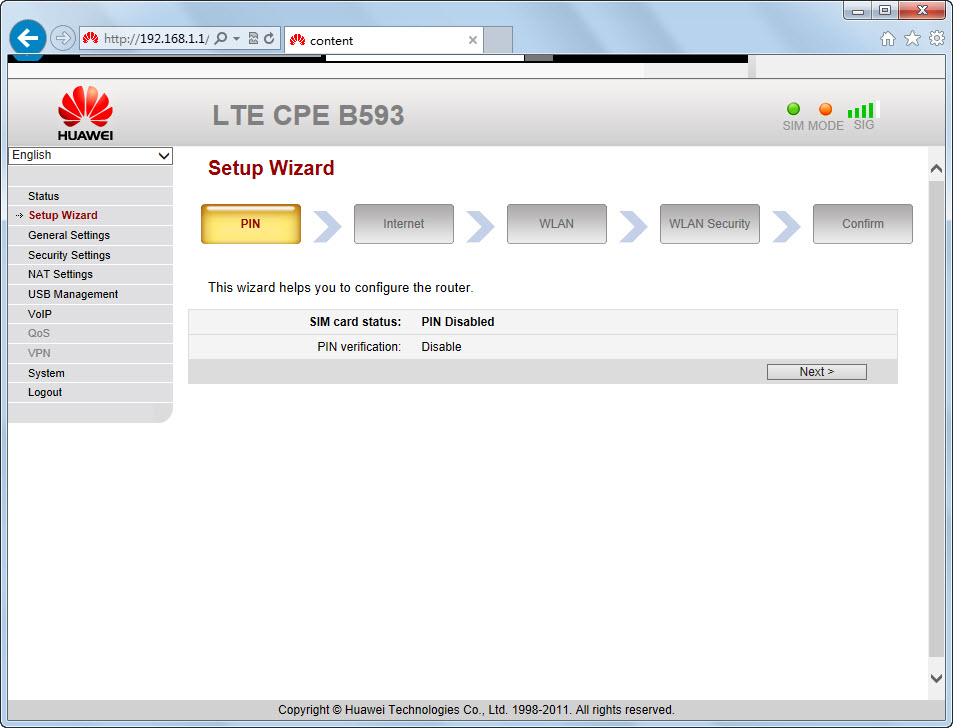
5) Now select Setup Wizard in the left menu.

You must validate your PIN to the SIM card. You will find PIN 1 on the frame, you took the SIM card out of the scrape area. Then click Validate. Tick the Enable next to Save my PIN and press Next.
Please note that the router stores the PIN code for the SIM card. Put a new SIM card in the router at a time; enter the PIN code for the new SIM card in the same way.

But if you use unlocked B593 Router, it’s unnecessary to do this. 4GLTEMALL.com is selling the unlocked B593 Router.


6) You do not need to change anything in the next section called Internet.
Network mode is by default to Auto and Connection Mode to Always On. Please note that “LTE Only” means “4G Only” and “WCDMA only” means “3G only” in Network mode. You can try to isolate the signal to one of them if you wish. If you set it in Auto as recommended, the router will always try to use 4G as a primary connection. Press Next.


7) You do not need to change anything in the next section called WLAN .
If you want to call your router something other than WLAN1-xxxx , it’s SSID , you need to change. We do not recommend that you do, and then you will always be able to find the router’s name on the back of the router if you do not change it. Press Next.


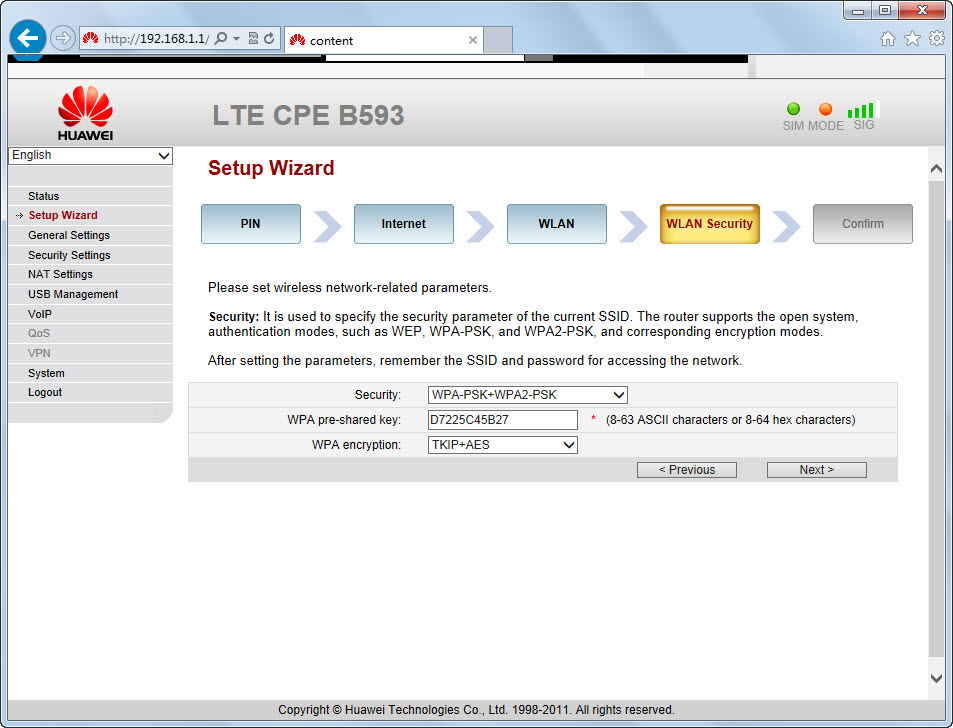
8) We do not recommend that you change the following in the next point WLAN Security. Network code field is WPA with pre-shared key. This code is already unique and you should only use it once when you connect to the router for the first time on your computer or your mobile. You will also be able to find the network code on the back of the router if you ever need it again later.
If you want to change it anyway, you must enter a code on minimum 8 characters and press Next. Otherwise, press the Next without changing the information below.


9) Now press Submit and your router will reboot and you will be on the internet.


10) Repeat point 2 for all devices to connect with the Internet.


Color Codes

Color Coding Mode on the front of the router
The purple color means that the router lacks the PIN. The blue color means that you are on 4G. The green color means that you are on 3G.

Firmware upgrade   — Quick Guide for upgrade

1)  Download the latest HUAWEI B593u-12 firmware upgrade>  (. zip 26 Mb)


2) Save the file to your desktop and unzip the file when you are finished.


3) Open your browser and log into your router via 192.168.1.1
Username: admin
Password: admin (lower case)


4) Select S ystem > Upgrade select tar.  (The file you just extracted from the zip. file)> press Upgrade, then wait for few minutes, the system will auto upgrade the firmware of the HUAWEI B593u-12.


These steps are also usable for HUAWEI B593s-22 and HUAWEI B593 other models, but the firmware varies.


Firmware  for  B593s-22 (source: unlockmodemfree )


Huawei B593s-22 V200R001B180D15SP00C00 (Normal)

Huawei B593s-22 V200R001B180D20SP00C00 (Universal)


Huawei B593s-22 V200R001B180D20SP00C209 (Megafon Russia)

Huawei B593s-22 WiFi Router V200R001B236D30SP00C00 (Universal)


Default user for Globe 

Open 192.168.1.1 and login as
Username: user
Password: @l03e1t3

 For Admin  and  software upgrader  Tools download below..

DOWNLOAD

HOW TO UNLOCKED SIM

Tutorial to unlocked this modem for Free!!
Visit: http://blogmytuts.blogspot.com/2014/05/unlocked-huawei-lte-b593-free.html

For B593s-931 LTE  August Firmware this is how you  unlock via Multicast  (upgrader) and admin access
Visit: http://www.blogmytuts.net/2015/09/unlocked-b593s-931-lte-august-firmware.html


NOTE : 
Here now we just know some of the brand models of HUAWEI B593, they support 4G LTE Frequencies as below:
HUAWEI B593u-12:  LTE  FDD 800/900/1800/2100/2600MHz
HUAWEI B593s-22:  LTE  FDD 800/900/1800/2100/2600MHz and TDD 2600MHz, LTE Category 4 CPE (Speed up to 150Mbps)
HUAWEI B593s-82: TDD 2300/2600MHz
HUAWEI B593u-91: LTE TDD 2300/2600MHz



Sunday, April 06, 2014

Facebook rolled out Free Voice Calling Feature to its Messenger

Facebook has rolled out new update versions for its Messenger chat service for Android and iOS users. For Android, the Facebook Messenger app has been updated to version 4.0, while for iOS it has been updated to version 4.1.

FACEBOOK DITCH WHATSAPP OVER CALLING FEATURE
WhatsApp was reportedly developing voice call feature since last year and when it was acquired by Facebook for $19 billion in February, users estimated that Facebook will add Internet calling feature to Whatsapp soon, rather than to its own Facebook Messenger.
However, the WhatsApp VoIP calling is still to come and is expected to launch the update with the feature in the coming weeks, but sadly before that Facebook may leave other popular free calling apps, such as Viber, Line, Google's Hangout, Skype behind.

USERS' PRIVACY AT RISK, AS NO ENCRYPTION
As expected, Facebook Calling service is not Encrypted at all and efforts of NSA and Edward Snowden's revelations realize all of us that there is no such thing as 'Privacy'.


The Android update (bringing the app to version 4.0) brings features seen in the Facebook Messenger 4.0 app update for iOS released in the last week of March. These features are group messaging, as well as message and photo forwarding. In addition, users will be able to pin contact shortcuts to their home screens - a feature also available in the new iOS app. Users can create a shortcut icon of any conversation with any of their friends - tapping on the shortcut will open that particular chat window.
Facebook is also touting the Android app's ability to make free calls (via Wi-Fi or mobile data) on its Play Store listing, something not previously listed despite the feature being available in certain regions. The same 'free calls' feature is also mentioned as the only update to Facebook Messenger 4.1 listing on iTunes. These feature being finally listed indicates the Facebook Messenger now supports data-based voice-calling in all countries.
Notably, the voice-calling feature on Facebook Messenger first arrived for iOS platform in January 2013. It was then slowly rolled out to the US, UK and Canada. Facebook brought the feature to its Android and iOS apps in India earlier in March.
The Facebook Messenger for Android version 4.0 is available to download from the Google Play store, while the Facebook Messenger 4.1 for iOS app is now available to download from the iTunes App Store.