This is default featured slide 1 title

Go to Blogger edit html and find these sentences.Now replace these sentences with your own descriptions.

This is default featured slide 2 title

Go to Blogger edit html and find these sentences.Now replace these sentences with your own descriptions.

This is default featured slide 3 title

Go to Blogger edit html and find these sentences.Now replace these sentences with your own descriptions.

This is default featured slide 4 title

Go to Blogger edit html and find these sentences.Now replace these sentences with your own descriptions.

This is default featured slide 5 title

Go to Blogger edit html and find these sentences.Now replace these sentences with your own descriptions.

Saturday, September 14, 2013

Android Browser: How to Reset to default settings

Android Browser: How to Reset to default settings


When tweaking the Android Browser to suit their needs, many users may end up with strange or unwanted behaviors in the browser. Here is how to reset the browser to the default settings.

5 step lamang.

1. Launch the browser.


2. Press the Menu button and choose More.


3. Go to Settings.


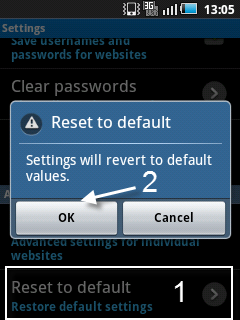
4. In the Settings screen, scroll down the bottom and choose Reset to default.


5. When the Reset to default window pops up, press OK  tapos.


How to Factory Reset your Android device

How to Factory Reset your Android device

In this tutorial we will show you how you can Factory Reset your Android device. But, before we get started, let’s go over what exactly happens when you do a Factory Reset on your Droid and also some of the reasons why you may or may not want to do it.


What happen when you  do Factory Reset :

 It erases all the data on your phone! It will wipe all the data off of the internal storage of the device and return it to the default factory settings. This means deleting the following from your device: your google account, system and application data, custom settings, and downloaded applications. In addition, you can also choose to have your external storage (SD card) erased as well. After the Factory Reset is complete your phone will operate in the same way it did the first time you turned it on. You’ll have to re-install all of your data and applications back onto the device.


Why would you want to do a Factory Reset?
  1. Malfunctioning device (resetting the phone to original settings may fix numerous issues)
  2. Wipe personal data off before selling
  3. Returning it to manufacturer or retailer and want all personal data removed
What to do before you do a Factory Reset?
  1. Backup any important files to your PC or external storage
  2. Make sure your contacts are synced with your Gmail account
  3. Write down a list of apps you may want to reinstall


Step-by-Step Instructions:

  1. From the home screen, click the MENU button
  2. Click on SETTINGS
  3. Select the “SD & Phone Storage” option
  4. Click on “Factory data reset” located at the bottom
  5. Final Warning: This next step will wipe all the data off of your device. You are also given the option to check mark whether you want to wipe all data from the SD card. 
  6.  Click on “Reset Phone” to finalize the Factory Reset
  7. Done!

Samsung announces Galaxy Gear smartwatch

Samsung announces Galaxy Gear smartwatch 

Powered by an 800MHz processor and 512MB of RAM, the touch interface is sleekly responsive, and the 1.63-inch, 320x320-pixel super AMOLED screen enormously bright and clear. White text and simple icons pop from the background colour of your choice, each function sitting in its own clear, friendly square that you can swipe between to find the one you want.
The Galaxy Gear has a metal face and -- hang on a minute: simple icons on clear, friendly squares? That sounds familiar...
Yes, before we go any further, we should address the fact that the interface of the Android-powered Samsung Galaxy Gear smartwatch is basically Windows Phone.


The camera
On the side of the strap is a small 1.9-megapixel camera, bulging slightly from the strap. Samsung calls it a memographer, emphasising the capture of moments with low-resolution snaps and bite-size videos rather than glorious crystal-clear pictures. The camera options are pretty basic: choose from auto or macro focus, and a couple of different sizes. Photos can be 1,392x1,392 or 1,280x960 pixels. Videos last 10 seconds, with sound, and can be 720p, 640x640, 640x480, or 480x480 pixels.
To take a picture, swipe up from the home screen and tap on the screen. I found that the camera took a moment to fire after I'd tapped the screen, so it could struggle with fast-moving action.


The interface
You control the watch by swiping left and right through a selection of screens. You can change the order they appear, but out of the box when you start scrolling to the right you go from the home screen to notifications, then voice memos, then S Voice commands, then your photo gallery, the music player, a pedometer, settings, and an apps shortcut. Scroll to the left and you see your contacts followed by a phone call log. The screens scroll continually, so when you get all the way to the end you come back round to the home screen and continue on out the other side.

Apps
Tap on the Apps screen and you're taken to a submenu of apps installed on the Gear. Samsung says at launch there'll be around 70 apps optimised for the Gear's small screen, most of which are basic apps like a calendar. There are some big names though, including Evernote and Pinterest, which can record and share your quick snaps; eBay and Path to keep an eye on your auctions and social networks; and RunKeeper and MyFitnessPal to follow your latest physical jerks.

Talking to your phone
The Galaxy Gear uses low-power Bluetooth to communicate with your smartphone -- and by "your smartphone," we mean "only the Galaxy Note 3," at least for now. When you pair the Galaxy Gear smartwatch with the Note 3, the watch talks to the phone to let you control music or view notifications without taking the phone out of your pocket. And it works the other way, too: the Gear Manager companion app installed on your phone lets you adjust the settings of your watch. Other options include the Find My Device feature: lose track of your phone, and you can use your watch to signal the errant blower, which will make a racket until you locate it. And vice versa: lose your watch, and use the companion app on your phone to set the watch ringing so you can return it to its rightful place on your wrist.



Thursday, September 12, 2013

iPhone 5C Budget Friendly

iPhone 5C Budget Friendly

       The iPhone 5C is  lamost the same of iPhone 5  when it comes on specs.
The iPhone 5C will sell for $99 in the United States for a 16GB model and $199 for a 32GB model.
Pre-orders start on Sept. 13 and the iPhone 5C will go on sale on Sept. 20 in the United States, China, Australia, Canada, France, Germany, Japan, Singapore and the United Kingdom.
By December, the iPhone 5C will be available in over 100 countries and on 270 carriers.

C for cheap


image from google

Running with the latest iOS 7 the iPhone 5C has the same physical dimension as the iPhone 5 and iPhone 5S, the iPhone 5C comes in the following colors: blue, green, yellow, pink and white.

Made  of soft silicon rubber rather than anodized aluminum fifth-generation iPod touch,
4-inch retina display and features the Lightning connector shared by the iPhone 5, iPad mini and full-sized iPad.

It has an A6 chip and a steel-reinforced structure. It also has a slightly larger battery than the iPhone 5.


The iPhone 5C's iSight camera has a 3x video zoom and a new Facetime HD camera. The rear camera is 8-megapixel, has backside illumination and a hybrid IR filter. It also supports more LTE bands than any other smartphone in the world.